
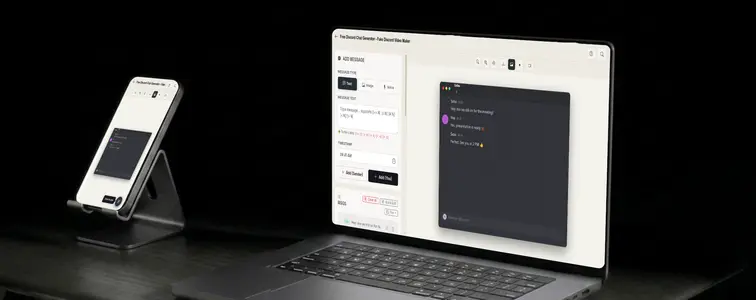
Discord has its own visual identity, and no other chat app looks like it. The dark interface, the way usernames appear above messages, the compact message rows, the server and channel structure in the background. It is the chat of communities, gaming, and developer groups, and a Discord screenshot carries all of that context with it.
That context is why Discord mockups are so common in community marketing, developer tooling pitches, and gaming content. It is also why they are easy to botch. A Discord mockup built on a generic chat template reads as wrong immediately to anyone who spends time in servers. The Discord Chat Mockup Generator in MockupTown matches the real interface and animates the conversation, so the mockup looks like it was pulled out of an actual server.
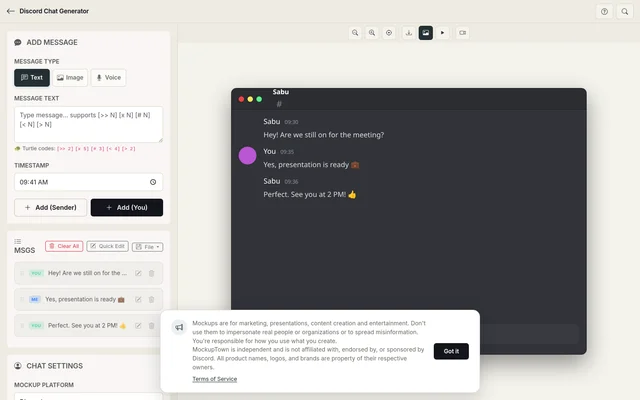 Discord Chat Generator.
What a Discord screenshot signals
Discord is not just another chat format; it is shorthand for a whole context. When you put a conversation in a Discord frame, you are making a statement about the audience:
- Community. It says the conversation happens inside a community, not a one-to-one inbox.
- Technical familiarity. Discord is the environment developers and gamers actually live in.
- Informality. Messages are fast, frequent, and conversational, with people jumping in and out.
The details that define the look
The format's identity lives in details a generic template would miss:
- The dark theme. Discord's signature dark interface is the whole vibe. Get it on a light template and it is instantly wrong.
- Usernames above messages. Discord shows the sender's name and avatar above the message text, unlike the bubble formats.
- The server and channel structure. The background rails, the channel list, the compact rows. They are part of what makes it Discord.
- Rapid-fire pacing. Messages arrive quickly and frequently. The animation should match that tempo.
Writing an exchange that reads right
- Keep messages short. Discord is a rapid-fire chat. Quick, frequent messages beat long monologues.
- Let each side have a voice. The two sides should sound like different people, with different typing habits, not two halves of one script.
- Use the usernames properly. The name at the top should match the tone and style of the messages underneath it.
- Pace the typing pauses. Discord replies come fast, so the pauses between them should be shorter than they would be in a more formal app.
- Use images sparingly. An attachment is a Discord-native detail, but only when the conversation around it makes the attachment make sense.
Constructing the thread
Getting started is quick: pick Discord from the platform picker, set the contact name and profile photo, write the exchange with the sender toggle, set the typing speed and timing, and export a high-resolution PNG. No uploads, no accounts, just the tool.
Where a Discord mockup lands
- Marketing campaigns. Community-focused brands use Discord-style mockups to show how people talk about them in servers, on landing pages.
- Presentations. Developer tools and gaming products get pitched with Discord screenshots, because it is the environment their audience already lives in.
- Content creation. Videos and articles about Discord culture, servers, and moderation are clearer with a realistic exchange to point at.
- Product launches. Game and community app launches tease reactions with Discord-style mockups before release.
- Educational content. Tutorials about running a server or handling a community are easier to follow with concrete examples.
The usual rule applies here as everywhere: these mockups are for demonstrations and clearly-marked content. Presenting a Discord mockup as a real conversation in a real server, with real member names, is the line, and it is easy to check when someone actually looks at the server.
Any time a Discord screenshot earns its place in your work, you can build the exact exchange instead of screenshotting someone's actual server. Open the Discord Chat Mockup Generator, choose the Discord style, write the exchange with realistic server pacing, then export an animated mockup as a PNG.
Made with MockupTown, the free all-in-one mockup generator.
Frequently asked questions
Does Discord Chat Generator cost anything?
Yes. No credit card, no trial countdown. Ignoring the upgrade banner costs nothing functional.
Are exports cleared for commercial work?
Cleared for commercial work from day one. No license key, no attribution line, no permission slip required.
Is signing up required?
None. No signup wall, nothing stored server-side - the tool is stateless by design.
Can I show server channels and roles?
Yes. Add channel names and role names so the screenshot looks like a realistic server conversation, not just two people messaging.