
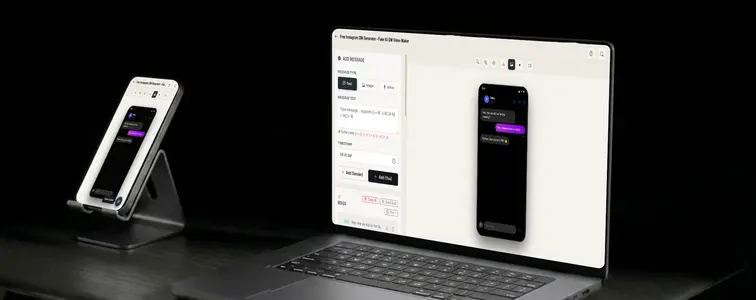
The Instagram direct message has become a favorite format of the creator economy. Brands show DMs in their marketing: influencers teasing brand deals, stores showing customer questions, agencies showing inbound interest. It is the modern version of the testimonial.
And like everything in this genre, it is easy to fake badly and hard to fake well. Instagram DMs have a particular look: the dark header, the round profile photo, the bubbles that sit differently from WhatsApp or iMessage, the typing bubble when the other side is replying. The Instagram DM Mockup Generator in MockupTown reproduces the real interface and animates the exchange, so the mockup passes the kind of glance it will actually get.
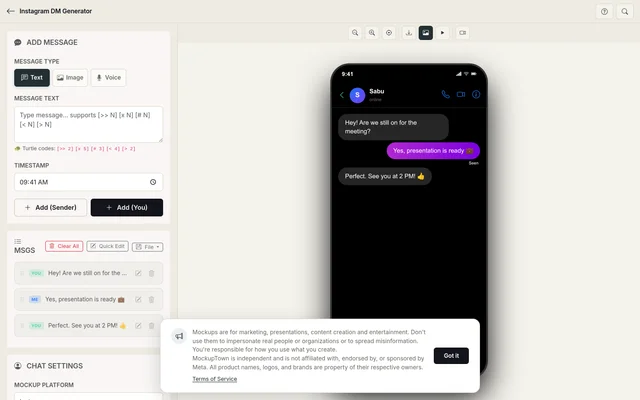 Instagram DM Generator.
The modern testimonial
A DM screenshot is the closest thing marketing has to a recorded conversation. It is why the format gets used everywhere demand needs to be shown, not claimed:
- It shows inbound interest rather than describing it.
- It is platform-native: it looks like the way customers actually reach out.
- It looks like a complete, finished exchange, even though you wrote it.
What separates a real-feeling DM from a staged one
The interface does half the work, and the writing does the other half:
- Keep messages short and casual. DMs are fast and informal. Long, formal messages in an Instagram DM are the fastest giveaway.
- Sound like a customer, not a copywriter. If the incoming side is a customer, they should ask the way real customers ask: simply, specifically, and without marketing vocabulary.
- Use the typing pause before good news. The pause before a positive reply builds the moment, and the typing bubble sells it.
- Match the profile to the story. The name and photo at the top should fit the exchange underneath, or the mockup falls apart.
- Use image attachments deliberately. A photo or a screenshot inside the DM works when the conversation refers to it.
The details that carry the look
The styling has a few non-negotiables that make a DM read as Instagram rather than "some chat app":
- The dark header. The DM header is dark, a deliberate contrast to the feed's brightness.
- The round profile photo. The circular avatar in the header is part of the identity.
- The bubble styling. DM bubbles sit differently from WhatsApp or iMessage, rounded, colored per message, with a distinct rhythm.
- The typing bubble. The animated indicator when the other side is replying is what turns a crop into a live-feeling thread.
Building the exchange
Start with these steps: pick Instagram from the platform picker, set the contact name and profile photo, write the exchange with the sender toggle, set the typing speed and timing, and export a high-resolution PNG. Your data never leaves the browser.
Where a DM screenshot does its job
- Marketing campaigns. The classic use: customer DMs on landing pages and in ad creatives, showing inbound interest in a product.
- Presentations. Creator and influencer agency decks use DM mockups to show the kind of engagement their clients generate.
- Content creation. Skits and content about DMs, from the awkward to the successful, are funnier with a realistic thread.
- Product launches. Simulating the kind of questions and excitement a launch will generate, as a teaser before release.
- Educational content. Guides on handling customer messages or improving social selling are clearer with a concrete example.
Fair warning: is the important one for this format, because DM mockups are the most commonly abused chat mockup. These are for demonstrating your own business's inbound interest and for creative content. Fabricating a DM from a real customer, or from a named real person who never sent it, is deception, not marketing, and it gets exposed the moment someone checks.
If your next deliverable calls for a an Instagram DM screenshot, you can build the exact exchange instead of cropping a real one. Open the Instagram DM Mockup Generator, choose the Instagram style, write the conversation, and export an animated mockup as a PNG.
Made with MockupTown, the free all-in-one mockup generator.
Frequently asked questions
Is Instagram DM Generator free to use?
Yes, and no credit card is ever asked for. Skipping the paid tier loses nothing this guide depends on.
Can I use the results commercially?
Yes - exports are yours to use anywhere. Ads, social posts, client deliverables, resale of your own designs.
Do I need an account?
Never. Close the tab and no trace remains anywhere except your own downloads folder.
What platforms are supported?
The format list runs nine deep: iMessage, WhatsApp, Instagram DM, Messenger, Telegram, ChatGPT, Discord, Slack, Twitter DM.