
Messenger has a look you can pick out of a lineup: the blue header, the circular profile photo, bubbles sitting on a light background rather than a dark one, the little blue check marks. It is the chat of small businesses answering questions, friend groups planning nights out, and the kind of casual communication that covers most of the internet.
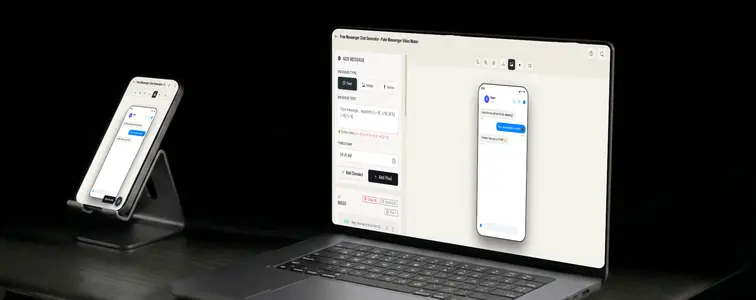
For marketers that association is useful. A Messenger conversation reads as personal and immediate, which makes it a natural format for customer-service examples. The catch is the same as every chat interface: render it wrong and it reads as fake. The Messenger Chat Mockup Generator in MockupTown matches the real styling and animates the conversation, so the mockup looks like it came out of an actual thread.
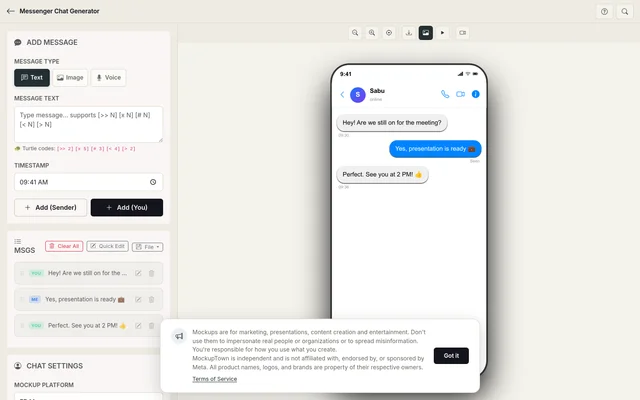 Messenger Chat Generator.
The case for Messenger in a mockup
Messenger occupies a specific slot among chat mockups. It is not the prestige of iMessage nor the ubiquity of WhatsApp; it is the approachable middle ground. That is exactly why it works for business conversations:
- It reads as approachable and real, the tone of a business that answers.
- It is the default customer-service format people picture when they imagine messaging a company.
- It has familiarity without weight: everyone knows it, nobody is intimidated by it.
The details that sell the interface
The styling carries more of the believability than people give it credit for:
- The light background. Messenger's bubbles sit on light, not the dark themes most chat mockups default to. Get this wrong and it is the first thing a Messenger user notices.
- The blue header. The signature color anchors the whole screen as Messenger.
- The circular avatar. The profile photo in a circle is part of the identity.
- The checks. Sent and read states are part of how Messenger tells the story of a thread.
Writing the exchange like a conversation
The styling gets the mockup to a glance, but the writing decides whether anyone reads it as real:
- Keep the tone warm and quick. Messenger is casual. Responses come fast and sound like a person, not a support-ticket template.
- Let the business side sound human. If it is a business conversation, the brand's side should still sound like a person answering; that is how good Messenger support actually reads.
- Pace the typing indicator. Short pauses for quick replies, longer ones before considered answers. The timing is what sells the animation.
- Match the names to the context. A customer-service mockup and a personal mockup need different kinds of contact names.
- Use attachments when they carry the story. A photo or link inside the thread works when the exchange builds toward it.
Putting the mockup together
Follow these steps: pick Messenger from the platform picker, set the contact name and profile photo, write the exchange with the sender toggle, then adjust typing speed and message timing before exporting a high-resolution PNG. The browser does all the work.
When it earns its place
- Marketing campaigns. Customer-service and support examples for landing pages are often Messenger-style, because it reads as approachable.
- Presentations. Teams pitching improved customer communication show the experience they are building toward in Messenger form.
- Content creation. Skits and content about online messaging use Messenger as the recognizable default for a Facebook-adjacent chat.
- Product launches. Showing how customers will reach out about a new product, in the channel they actually use.
- Educational content. Guides on handling customer messages or using Messenger for business are clearer with a concrete example.
The same principle applies here as it does everywhere: Messenger mockups are for demonstrating your own business and for creative content. Passing one off as a real conversation with a real customer, using a real name, is the line, and it is easy to check.
Any time a Messenger screenshot earns its place in your work, you can build the exact thread instead of cropping a real one. Open the Messenger Chat Mockup Generator, choose the Messenger style, stage the thread with seen-checkmarks timing, and export an animated mockup as a PNG.
Made with MockupTown, the free all-in-one mockup generator.
Frequently asked questions
How much does Messenger Chat Generator cost?
Yes - the whole feature set runs at no cost. All of it is available before any account would even be possible.
Is commercial use allowed?
Commercial use is explicitly fine. Ads, packaging, client handoffs - cleared without a license note.
What about accounts or logins?
Not at all - anonymous by default. Registration was never built; the page runs on plain browser JavaScript.
Can I add reactions to messages?
Yes. Add emoji reactions to individual messages so the conversation looks naturally lived in, not obviously generated.