

MockupTown gives you a blank canvas: type a message, pick a platform, and generate a realistic chat, post, or device frame in seconds. That power is meant for one thing - presenting your own work. This guide is about using it honestly, so your mockups stay useful, legal, and above board.
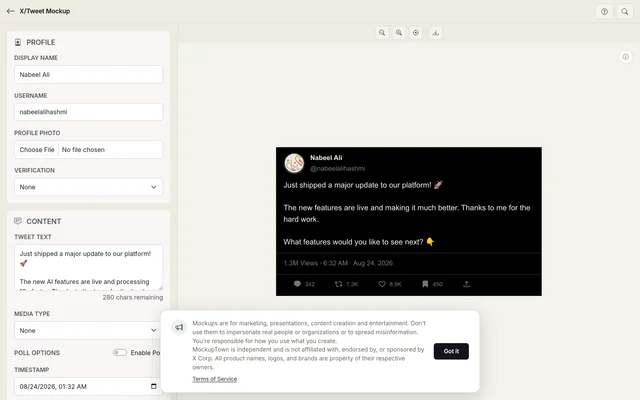 A generated tweet mockup - built for concepts, portfolios, and clearly-fictional examples.
What mockups are for
A mockup is a preview, not a proof. The right uses:
- Showing your own app, website, or product inside realistic frames
- Demonstrating how a feature or message would look
- Testing design ideas before you build them
- Creating portfolio pieces, presentations, and ad concepts
- Making training or internal materials
Every one of these is honest: someone looking at it understands it's a mockup of your idea.
What mockups are not for
This is where mockups get abused. Don't use them to:
- Fake testimonials or reviews. A chat screenshot of "Sarah" praising your product isn't a review unless Sarah actually said it. Fabricated reviews mislead customers and can get your ads and accounts banned.
- Fake chat screenshots as evidence. Don't present a generated conversation as a real one - in disputes, support tickets, or anywhere it could be relied on as fact.
- Doctored sales or performance claims. A mockup of "1,000 customers" isn't a real metric.
If it would deceive a reasonable person about something real, it's not a mockup anymore - it's a fake.
Don't impersonate people or brands
Real people's names, faces, photos, and handles belong to them. The same goes for brands: logos, product names, and trademarked looks.
- Don't create a chat or post that is a real celebrity, public figure, or private individual
- Don't imply an endorsement or partnership that doesn't exist
- Don't copy another brand's name, logo, or trade dress for your own account
Using a platform's generic skin (the look of a message thread) is fine. Pretending to be someone or something real is not.
Respect copyright
The assets inside your mockup should be yours or licensed:
- Artwork, photos, and fonts you don't have rights to
- Logos or trademarks you're not authorized to use
- Product screenshots that aren't your own product
When in doubt, assume you need permission. Attribution doesn't automatically make it legal to use someone's work.
Be honest in advertising
If you use mockups in ads, the same rules as consumer protection apply:
- Don't claim a product has features it doesn't
- Don't show inflated results or fake testimonials
- Make sure what's pictured actually matches what's delivered
Ad platforms (including Google and Meta) enforce this. Misleading mockups don't just look bad - they get ads disapproved and accounts suspended.
Label when it matters
Where someone might mistake a mockup for the real thing, say so. A simple line - "concept mockup", "design preview", or "for illustration only" - keeps things honest. Especially for:
- Client presentations of concepts not yet built
- Marketing material showing planned (not shipped) features
- Anything that resembles a real transaction or conversation
What we won't allow
To keep the platform safe for everyone, we won't help with mockups that:
- Impersonate real people, brands, or government entities
- Fabricate testimonials, reviews, or legal documents
- Promote scams, harassment, or illegal activity
MockupTown is a creative tool. If you're unsure whether a use is OK, it probably isn't - keep it a mockup of your own work, labeled as such.
The honest mockup checklist
Before you hit export, run through this:
- Is this clearly my work or concept?
- Could someone mistake it for something real?
- Does it involve a real person's or brand's identity?
- Does it claim a result I can't back up?
If any answer is "yes" to 2-4, either label it clearly or rethink it. That's how mockups stay a force for good design - not deception.
Made with MockupTown, the free all-in-one mockup generator.
Frequently asked questions
Is the tool free to use?
Zero cost at every step. All of it is available before any account would even be possible.
Can I use the results commercially?
Without restriction. Campaign use, printing, resale - all permitted.
Do I need an account?
Accounts simply do not feature here. No registration exists to waive - the app is plain client-side JavaScript.
Can I add images and polls to the tweet?
You can. Add one picture or a four-image grid, and if you want a poll attached you get up to four options and custom percentages.