

The Animated Conversation Creator lets you build realistic chat mockups that type themselves out character by character. What makes it truly powerful is Turtle of Ark, a set of control codes you embed directly inside your messages to script the animation down to the keystroke.
This guide covers every code, how they work together, and real scenarios you can build.
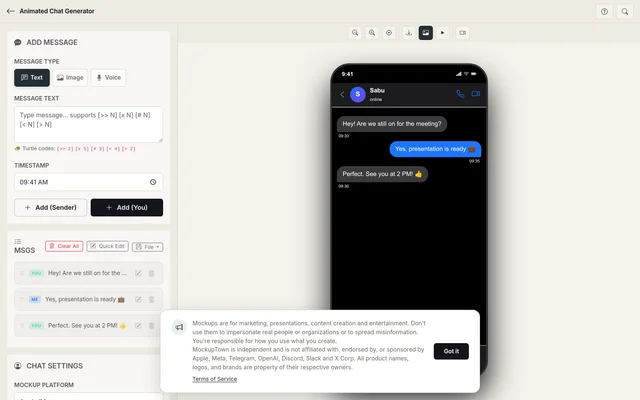 The Animated Chat Generator - Turtle of Ark codes are embedded directly in the message text.
What is Turtle of Ark?
Turtle of Ark codes are short commands placed inside any Me message text. During animation playback, the typing engine executes them to:
- Move the cursor left or right
- Backspace characters mid-type
- Clear everything currently typed
- Pause the animation
- Trigger incoming messages from the other person while you're still typing
This lets you create conversations that feel real: corrections, interruptions, overlapping replies, instead of a flat sequence of messages appearing one after another.
Code reference
All codes go inside your message text. N is a number; the bare [x] takes no number and clears the whole message.
[< N] : Move cursor left
Moves the typing cursor N characters to the left without deleting anything. Useful for jumping back to edit earlier text.
Hello[< 5]Types "Hello", then moves the cursor 5 chars back so it sits right after "H".
[> N] : Move cursor right
Moves the typing cursor N characters to the right. Usually follows [< N] after you've made an edit.
Hell[> 1]Types "Hell", moves cursor 1 char right (to the end).
[x N] : Backspace
Backspaces N characters from the cursor position. This is how you create corrections.
I love iphone[x 6]calculatorTypes "I love iphone", then backspaces 6 chars (erasing "iphone"), then types "calculator". The viewer sees: "I love iphone" → correction → "I love calculator".
[x] : Clear everything
Erases the entire message typed so far, not just N characters. No number needed. Great for dramatic "scratch that" retypes.
oops[x]Server error[x]Everything fineTypes "oops", clears it mid-type, types "Server error", clears that too, then types "Everything fine". Only "Everything fine" survives as the sent message.
[# N] : Pause
Pauses the animation for N seconds. Use this to create realistic delays: thinking time, waiting for a reply, or dramatic pauses.
Are you sure?[# 2]I mean really sure?Types "Are you sure?", pauses 2 seconds, then types "I mean really sure?".
[>> N] : Trigger contact messages
Triggers N messages from the Contact side to appear mid-typing. This is the most powerful code: it creates the illusion of a real back-and-forth happening while someone is still composing.
I'm sending you a gift[>> 2]During the "I'm sending you a gift" message, the animation pauses typing and the next 2 Contact messages play. After they finish, typing resumes.
Putting it together
Here's the gift scenario from the tool's built-in example:
Me: Hi!
Them: Hey!
Me: I'm sending you a gift.
Them: What's that?
Me: this is a brand new iphone[>> 2][# 3][x 6]calculator
Them: I'm sending you a gift too.
Them: It is a book.
What happens during playback:
- "Hi!" types out and sends
- "Hey!" appears from Them
- "I'm sending you a gift." types and sends
- "What's that?" appears from Them
- "this is a brand new iphone" starts typing
[>> 2]triggers both Them messages ("I'm sending you a gift too." and "It is a book.") to appear mid-type[# 3]pauses 3 seconds[x 6]backspaces "iphone"- "calculator" finishes the message
The result: a single message that corrects itself while the other person's replies arrive in between. That's the kind of realism you can't get with static mockup tools.
Practical scenarios
The correction
The meeting is at 3pm[x 5]4pm.Types "The meeting is at 3pm", corrects to "4pm". Shows natural human typing.
The thoughtful pause
That's a great question.[# 3]Let me think about it.Adds a 3-second pause between sentences. Feels like real contemplation.
The interruption
I wanted to tell you something importa[>> 1]nt
Me (message 1): I wanted to tell you something importa
Them: Wait, let me guess!
Me (continues): nt
Contact interrupts mid-word. Extremely realistic.
The dramatic reveal
I have something to tell you...[# 2][x 3]Surprise!Types "...", pauses, backspaces the dots, types "Surprise!". Builds anticipation.
Tips for realistic animations
- Don't overuse codes. One or two per conversation looks natural. A code in every message looks scripted.
- Use
[# 1]for natural pauses. People pause about 1 second between sentences in chat. - Pair
[>> N]with Contact messages. If you trigger 2 Contact messages, make sure you actually have 2 Contact messages queued. - Timing matters. A 0.5-second pause reads differently from a 3-second pause. Match the emotional beat.
- Test before exporting. Hit "Play Animation" to see how it flows. Adjust codes until the timing feels right.
Why "Turtle of Ark"?
The name is a callback to Turtle graphics: the Logo programming language where you controlled a turtle's movement with simple commands like forward 50 and right 90. Turtle of Ark applies the same idea to text: small commands that control the typing cursor instead of a drawing turtle.
"Ark" refers to the internal project name for the animation engine that powers all chat mockups on this site.
Start scripting
Open the Conversation Creator, add some messages, and embed a few Turtle codes. Hit play and watch your conversation come to life.
Made with MockupTown, the free all-in-one mockup generator.
Frequently asked questions
How much does the tool cost?
Completely free since launch. Each step works with zero credentials, because there are none to give.
Is commercial use allowed?
Without restriction. Run them in paid channels without clearing anything.
What about accounts or logins?
Never. The editor is already live when the page loads.
What platforms are supported?
Built-ins span personal and workplace chat alike: iMessage, WhatsApp, Instagram DM, Messenger, Telegram, ChatGPT, Discord and Slack.