
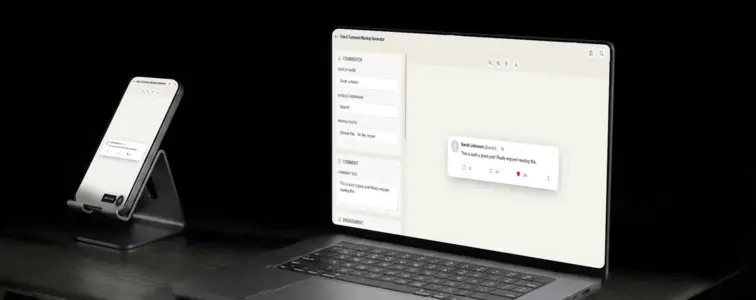
X replies are threaded, minimal, and designed for speed. The circular profile picture, the bold display name, the handle in grey, the dot separator, the timestamp. Below the text, a row of icons: reply, retweet, like, share. The entire design communicates brevity and directness, which is exactly what X's brand is built on. When someone sees a reply card in X styling, they immediately think of real-time conversation, hot takes, and the kind of public discourse that happens on the platform.
That is what makes an X comment mockup valuable. When you are building pitch decks, designing social media strategy documents, or creating content that needs to feel native to the X ecosystem, the reply format communicates platform context without any additional explanation. The problem is that building a convincing X reply card by hand is tedious, because the specific font sizes, spacing, and icon placement are precise. The X Comment Mockup Generator in MockupTown renders the actual layout, so your mockup looks like it belongs on the platform.
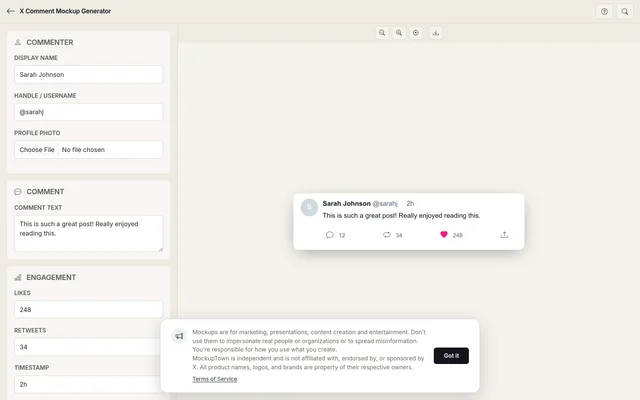 X Comment Mockup.
Why X replies feel different
X replies are different from other comment formats because they are public conversations. Every reply on X is visible to anyone who can see the original post, which means the design needs to communicate context quickly. The layout is compact: the profile picture, name, and handle are on one line, the text is below, and the action row is at the bottom. There is no room for clutter.
The action row is the most distinctive element. X uses four icons: a speech bubble for replies, a circular arrows icon for retweets, a heart for likes, and an upward arrow for share. Each icon has a number next to it, showing the engagement count. The heart icon turns pink when liked, and the retweet icon turns green when retweeted. These colour changes are part of the platform's visual language.
The anatomy of an X reply
An X reply has a specific structure that the generator reproduces accurately:
- The profile picture. A circular avatar on the left, 40 pixels. X uses larger avatars than Instagram or TikTok, because the profile picture is an important part of the platform's identity.
- The display name. Bold text next to the avatar, typically the person's real name or brand name.
- The verified badge. An optional blue checkmark that appears next to the display name. On X, the badge is a small icon, similar to Instagram.
- The handle. Grey text showing the @username, with a dot separator and the timestamp.
- The reply indicator. When the reply is in response to another post, X shows "Replying to @username" above the text. The generator includes this as an optional field.
- The reply text. The main body of the reply, in a clean sans-serif font. X replies tend to be concise because of the character limit.
- The action row. Four icons with numbers: reply count, retweet count, like count, and share button.
The action row speaks for itself
The action row is where engagement lives on X. Each icon represents a different kind of interaction: replies show conversation, retweets show amplification, likes show approval, and shares show distribution. The numbers next to each icon tell the story of how the content is performing.
The like icon is especially important. When someone likes a post on X, the heart icon fills with pink colour. This is one of the mostrecognised visual cues on the internet. The generator renders this correctly, with the pink heart for liked states and the grey outline for unliked states.
The details that make it look like a real X reply
- Use the right font. X uses the "Chirp" font family, which is a custom typeface. The generator uses a system font stack that approximates the look.
- Format the action row correctly. Each icon should have a number next to it, with proper spacing. The generator handles this.
- Add the verified badge when appropriate. The blue checkmark on X has specific meaning. Use it for verified accounts.
- Use relative timestamps. X shows "2h" or "3w," not absolute dates. The generator handles this.
- Keep replies concise. X replies tend to be shorter than other platforms because of the character limit. A one or two-sentence reply reads as natural.
Where an X comment mockup earns its place
- Pitch decks. The most common use: showing what engagement looks like in X-style presentations. The format is instantly recognisable to anyone who uses the platform.
- Social media strategy documents. Marketers use X reply mockups to illustrate engagement strategies, response templates, or community management workflows specific to the platform.
- News and media articles. Journalists and bloggers covering Twitter/X culture, platform changes, or social media trends need reply visuals. A mockup gives the article a professional feel.
- Brand presentations. Companies showing their X presence to partners, investors, or clients use reply mockups to demonstrate community engagement.
- Educational content. Courses on social media marketing use X reply mockups to teach students about platform-specific engagement patterns.
One rule to follow: is important: comment mockups are for presenting your own work, designing pitch decks, and illustrating concepts. Using them to mislead audiences about sentiment crosses a line that is not worth crossing.
Building an X reply in two minutes
Open the X Comment Mockup Generator, enter the commenter name, handle, profile photo, reply text, like count, retweet count, and reply count. Toggle the verified badge on or off. Pick light or dark mode. Export as a high-resolution PNG. No server involved, everything is local.
The generator uses the actual X reply layout, with the correct avatar size, the verified badge, the action row with icons and numbers, and the accurate colour palette. The result looks like a screenshot from a real X thread, not a hand-built approximation.
When your project needs an X reply visual, you can build the exact card instead of describing one in text. Open the X Comment Mockup Generator, set the details, and export a mockup that looks like it belongs on the actual platform.
Made with MockupTown, the free all-in-one mockup generator.
Frequently asked questions
Can I show all four engagement metrics?
Yes. Replies, reposts, likes and view counts are all independently editable. Set each one to match the specific reply scenario you are building.
Does it support the blue verified badge?
Yes. Toggle the blue checkmark next to any username. It matches X's verified badge exactly.
Can I add a view count?
Yes. X shows view counts on posts and replies. The mockup includes an editable view count field that displays in X's format.
Does it support the dim theme?
Yes. The mockup supports all three X themes: light, dim (dark blue-gray) and dark (true black). Switch between them without re-entering data.