
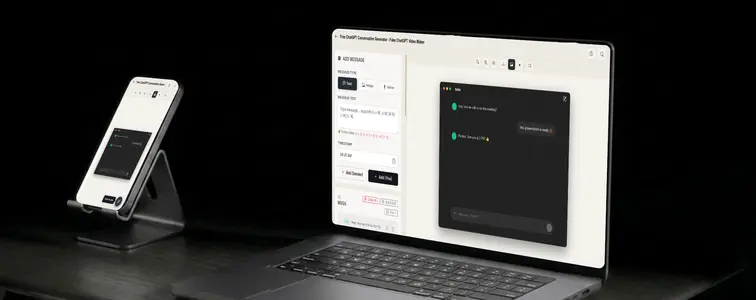
AI content is everywhere in marketing now, and the ChatGPT screenshot has become its most common visual shorthand. Landing pages use it to show a product answering questions. Agencies use it in decks to demonstrate prompt skills. Courses use it to teach prompting. A well-made ChatGPT screenshot does the job better than any description, because everyone recognizes the interface instantly.
The interface is also the problem. ChatGPT has a very specific look: the alternating bubbles, the darker assistant side, the input bar at the bottom. A mockup that gets any of it wrong reads as fake to anyone who has used the tool for a week. The ChatGPT Conversation Mockup Generator in MockupTown matches the real styling, and it adds animation on top, so the mockup can show the conversation coming to life.
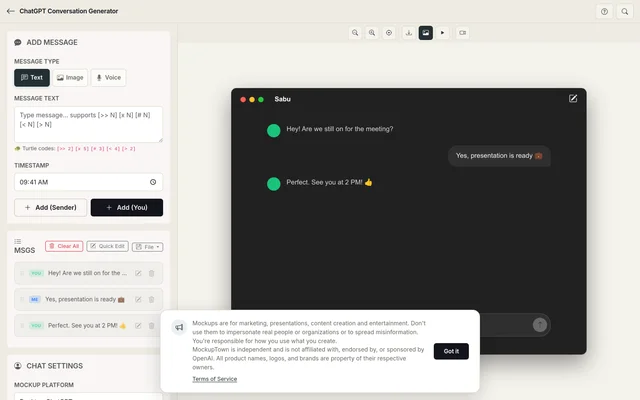 ChatGPT Conversation Generator.
The specific look, and why it matters
A ChatGPT mockup lives or dies on the interface details. They are the difference between "this is a chat screenshot" and "this is a ChatGPT screenshot":
- The alternating bubbles. User on one side, assistant on the other, with the assistant's messages carrying the darker treatment.
- The input bar. The familiar bottom bar is part of the identity; get it wrong and it stops reading as the tool.
- The pacing. ChatGPT answers feel considered. The pause before a long response is part of the experience.
The animation changes the persuasion
This is where a ChatGPT mockup separates from a generic chat image. Watching the assistant reply after a typing pause sells the interaction in a way a still frame cannot. It turns "here is a screenshot" into "here is what using this looks like," which is exactly what a product demo needs.
Writing a conversation that reads naturally
The interface gets the mockup to a glance; the writing decides whether anyone believes it:
- Prompt like a person. The user side should sound like a real user, not a marketing brief. Short, specific, and sometimes a little casual.
- Let the assistant answer fully. ChatGPT answers are structured but natural. A mockup answer that reads like a slogan is a giveaway.
- Alternate the sides. A conversation where one side sends six messages in a row is not a conversation.
- Use the typing pause. The pause before a long answer is part of the ChatGPT experience. Script it in and the mockup feels alive.
- Keep image attachments relevant. If you add an image to a message, make sure the surrounding exchange acknowledges it.
From prompt to finished mockup
Build it in a few steps: pick ChatGPT from the platform picker, set the contact name and profile photo, write the exchange alternating between the user and the assistant, adjust the typing speed and timing, and export a high-resolution PNG. Everything stays on your device.
Where an AI conversation visual helps
- Marketing campaigns. Showing an AI product in conversation on a landing page is the standard way to demonstrate it, and a mockup lets you script the exact demonstration.
- Presentations. Investor decks and client presentations use ChatGPT-style visuals to show AI capabilities without running a live demo.
- Content creation. YouTube thumbnails and blog posts about AI are far clearer with a concrete conversation example.
- Product launches. Tease an AI feature by showing the kind of conversation users will have with it, before it ships.
- Educational content. Prompting guides and AI tutorials are much easier to follow with realistic do-and-don't examples side by side.
A quick word on ethics: matters here because AI screenshots are used as proof. These mockups are for demonstrating your own product, teaching, and creative content. Using one to claim a real AI model produced a specific output it never produced is the line, especially in anything that could influence a purchase or a grade.
A ChatGPT screenshot comes up more often than people expect, and when it does, you can build the exact exchange instead of cropping a real one. Open the ChatGPT Conversation Mockup Generator, select the ChatGPT style, write the exchange, and export an animated mockup as a PNG.
Made with MockupTown, the free all-in-one mockup generator.
Frequently asked questions
Do I have to pay for ChatGPT Conversation Generator?
Free, without a crippled tier pushing you toward an upgrade. Optional Pro upgrades only add larger export sizes.
May I use these in client projects?
Freely. Ads, prints, merchandise - every channel is fine.
Do I have to register first?
No account exists to create. You would struggle to find where to sign up, because that option does not exist.
What platforms are supported?
Supported styles today: iMessage, Twitter DM, Slack, Discord, ChatGPT, Telegram, Messenger, Instagram DM and WhatsApp.