
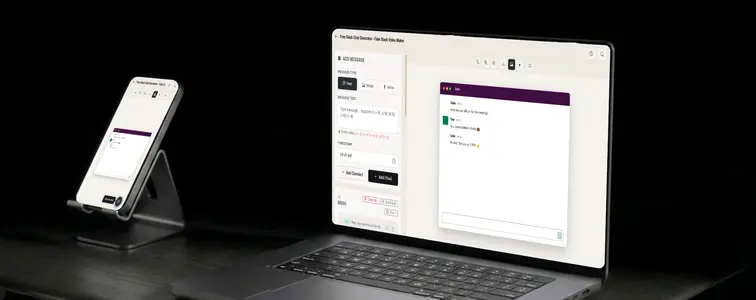
Slack is the chat of work, not the idealized version, the one that actually exists: the channels, the huddles, the messages that start with someone dropping a link and end with everyone agreeing. And because it is the default for workplace communication, it is also the default format for showing workplace communication in a mockup.
SaaS products built for teams show Slack-style screenshots everywhere, because the audience instantly understands the context. The catch is that Slack has a very particular layout: the sidebar, the channel header, the message rows. A mockup that ignores that layout reads as a generic chat, not as Slack. The Slack Chat Mockup Generator in MockupTown reproduces the styling and animates the conversation.
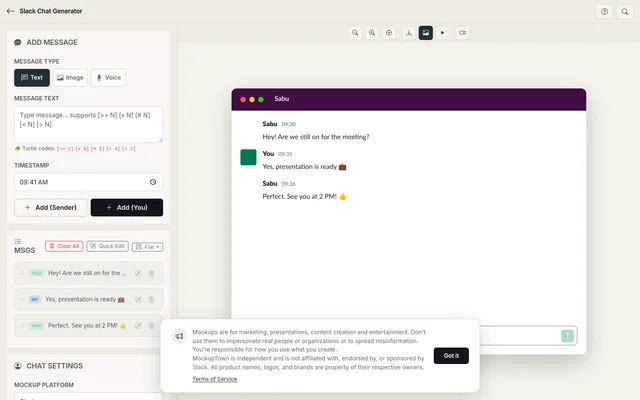 Slack Chat Generator.
What a Slack screenshot communicates
Slack-style mockups are a form of visual shorthand. A conversation in a Slack frame says specific things to a viewer:
- This is a workplace. The context is professional before a single word is read.
- This is a team. The channel structure implies colleagues, not strangers.
- This is internal. Slack reads as the real back-and-forth behind the scenes, which is why it works so well as proof of a tool in its natural habitat.
The layout that separates Slack from "some chat"
The believability rests on structural details that generic chat templates miss:
- The channel framing. The sidebar, channel header, and workspace chrome are what make it Slack rather than a messenger.
- Usernames with context. Messages are tied to a person and a time, the way work messages are.
- The pacing. Work chat moves in bursts: a question, a reply, a decision, with real pauses between.
- The message format. Compact rows, concise text, attachments that earn their place.
Writing a thread that sounds like work
- Keep it concise. Slack is for quick communication. Short, direct messages are the native format.
- Sound like a colleague, not a memo. Real Slack messages are informal, with contractions and abbreviations, not polished corporate language.
- Move the thread forward. A good Slack exchange has momentum: a question, a reply, a decision. A mockup that stalls reads as fake.
- Pace the replies like a busy team. Replies come in bursts, with pauses, the way real teams answer between other work.
- Match the names to the team. The people in the thread should sound like they work in the same place.
Running through the builder
The build takes a minute: pick Slack from the platform picker, set the contact name and profile photo, write the exchange with the sender toggle, set the typing speed and timing, and export a high-resolution PNG. Built entirely in the browser.
Where the format does its work
- Marketing campaigns. Team and collaboration products use Slack-style mockups to show their tool in its natural habitat, on landing pages and in ads.
- Presentations. Internal tooling pitches and workflow decks use Slack screenshots to show current or desired team communication.
- Content creation. Videos and articles about remote work and team culture use Slack mockups as the visual shorthand for work chat.
- Product launches. Collaboration tools tease how their product will change a team's Slack experience before shipping.
- Educational content. Guides on Slack etiquette, remote collaboration, and team communication are clearer with a concrete exchange.
One thing to keep in mind: is the standard one: Slack mockups are for demonstrating your own product and for clearly-marked content. Fabricating a real conversation with real colleague names, especially for internal approval or hiring context, is the line, and it is easy to verify.
Whenever a Slack screenshot would help tell the story, you can build the exact exchange instead of cropping a real workspace. Open the Slack Chat Mockup Generator, choose the Slack style, write the thread, and export an animated mockup as a PNG.
Made with MockupTown, the free all-in-one mockup generator.
Frequently asked questions
Do I have to pay for Slack Chat Generator?
Zero-priced and honest about it: everything you read above needs no account, no plan, and no payment method.
May I use these in client projects?
Without restriction. Teams drop these exports into investor decks and ad creative constantly.
Do I have to register first?
No account exists to create. No singup form, no OAuth popup, no continue-with-Google - straight to the canvas.
Can I show channel names?
Yes. Add a channel name so the screenshot reads like a team workspace, which makes team and onboarding examples much more realistic.