Celebrating birthdays of my guardian and heir 🎉. All tools are WATERMARK FREE and with many PRO FEATURES available for the whole month of August!

MockupTown
Screenshots Use cases Features Help All Tools

Free Google Review Mockup Generator

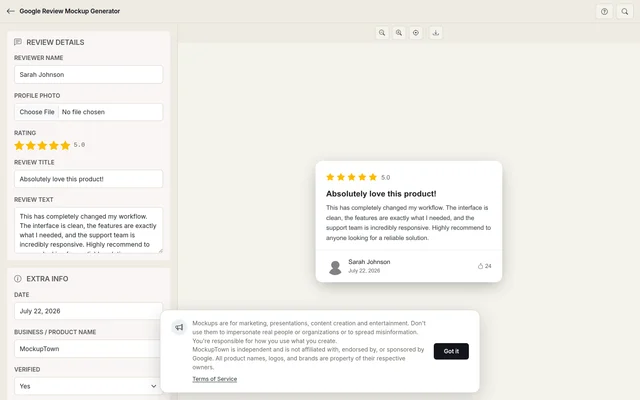
Build a realistic Google review card with star ratings, business name, location pin and verified Local Guide badge. The layout matches what customers see on Google Maps and Search. Export a clean PNG in seconds.

Free Google Review Mockup Generator
Screenshots

See it in action

Reviewer identity

Reviewer identity

Set the reviewer's display name and profile photo placeholder. Google reviews show a circular avatar next to the name, and the preview mirrors that layout.

Business details

Business details

Add the business name, location and star rating. The card picks up Google's exact star color and spacing so it reads like a real Maps listing.

Review body

Review body

Write the review text and set the date. Long reviews truncate with a "Read more" link, matching Google's actual behavior.

Export

Export

Download the finished card as a high-resolution PNG, ready for slide decks, websites or printed materials.

Use cases

Who uses Google Review Mockup?

When you are selling local SEO services, showing a business owner what a five-star Google review looks like next to their name on Maps is more persuasive than a spreadsheet of rankings. Build a mockup with their business name and a glowing review, then drop it into the proposal.

  • Show clients their potential Maps listing
  • Pair review mockups with ranking data
  • Make local SEO proposals concrete
Build review card mockups to pair with ad copy and campaign assets. A strong star rating beside ad text gives the creative a visual anchor. Test different rating scenarios and review lengths before committing to a final layout.

  • Create review visuals for ad creatives
  • Pair star ratings with campaign assets
  • Test different rating scenarios

Restaurants live and die by their Google rating. A mockup showing a 4.8-star review with a specific customer quote works in investor decks, franchise pitches and manager training decks. It tells the story faster than a paragraph of text.

  • Visualize rating improvements over time
  • Showcase specific customer quotes
  • Strengthen franchise and investor materials

Reputation management companies send monthly reports to clients showing review trends. A mockup of a negative review next to a positive one illustrates the response strategy without exposing real customer names in the report.

  • Illustrate review response workflows
  • Compare negative and positive scenarios
  • Protect real customer identities in reports

Businesses often design "As seen on Google" sections for their homepage. A mock review card styled to match Google's layout gives the section a consistent visual treatment across different review sources.

  • Build "As seen on Google" sections
  • Match the exact Google review appearance
  • Keep testimonial sections visually consistent
Features

Everything you need

Pixel-accurate Google review card
Layout

Pixel-accurate Google review card

The mockup follows Google's actual review card structure: circular avatar placeholder, reviewer name in Google Sans, star rating in the correct yellow, business name with a location pin icon, and the review body in the platform's body font. Every spacing value and color matches what appears on a real Google Maps listing.

  • Google Sans typography
  • Correct star color and sizing
  • Location pin and business name layout
Local Guide and verified badges
Badges

Local Guide and verified badges

Google reviews from Local Guides carry a special badge. The mockup includes a toggle for this badge, plus a verified review indicator. These small details are what make a mockup read as platform-accurate rather than generic.

  • Local Guide badge toggle
  • Verified review indicator
  • Review count display
Photo review support
Photos

Photo review support

Google lets reviewers attach photos to their reviews. The mockup includes a photo row below the review text, showing thumbnails in the same grid layout Google uses. This matters when you are demonstrating what a photo-rich review looks like.

  • Photo thumbnail grid below review text
  • Matches Google's photo review layout
  • Optional photo row toggle
Google Light and Dark modes
Themes

Google Light and Dark modes

Google Maps and Search both support dark mode on mobile and desktop. The mockup renders in either theme, using Google's actual background and text colors for each mode. Pick whichever matches the device your audience uses.

  • Light mode with white background
  • Dark mode matching Android and iOS
  • Correct text color contrast per theme
High-resolution PNG download
Export

High-resolution PNG download

The exported PNG is crisp enough for a full-width website banner or a printed proposal page. No compression artifacts, just the review card on a transparent or solid background.

  • Resolution suitable for print
  • Clean PNG with no overlays
  • Transparent background option
Help

How it works

1

Set the reviewer

Enter the display name the reviewer would show on Google. Optionally add a Local Guide badge toggle.

2

Write the review

Set the star rating from 1 to 5, then write the review title and body text. Google truncates long reviews, and the preview reflects that.

3

Add business info

Enter the business name and location. The card displays these next to a map pin icon, just like a real Google listing.

4

Pick a theme and export

Choose light or dark mode, then click the download button to save the mockup as a high-resolution PNG.

No. The mockup is built from scratch in your browser. Nothing is fetched from Google's servers, and no Google account is required.

Yes. The editor includes a toggle for the Local Guide badge, which displays next to the reviewer name just as it does on a real Google review.

Choose any rating from 1 to 5 stars. The stars use Google's exact yellow color and are sized to match the platform's layout.

Yes. The mockup supports a photo row below the review text, using the same thumbnail grid layout Google uses for photo reviews.

Yes. The output resolution is designed for both screen and print use. The PNG downloads at a size that stays sharp on a full-page document.

Yes. The Google Review Mockup Generator is free to use and no account required.

Disclaimer

Intended usage

This tool is made for marketing, presentations, content creation and entertainment. Don't use it to impersonate real people or organizations, or to spread misinformation. You're responsible for how you use what you create - see our Terms of Service.

MockupTown is independent and is not affiliated with, endorsed by, or sponsored by Google. All product names, logos, and brands are property of their respective owners.

Free forever, or go Pro Visa

Pro Visa unlocks higher resolution exports and no promotional elements.

Create your Google review mockup

No signup, no credit card - build a realistic review card in under a minute.

Open Google Review Mockup
Google Review Mockup