
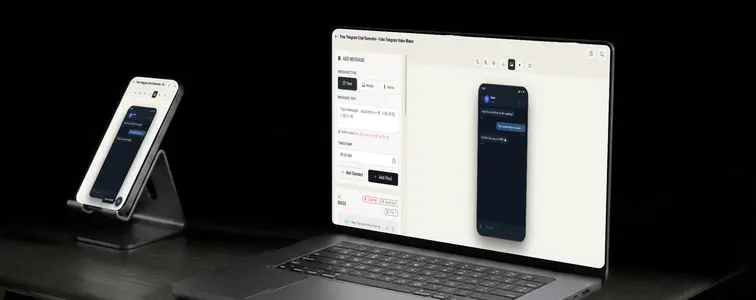
Telegram sits in an interesting spot among messaging apps. It has the scale of a mainstream chat app, but it is the one that technical audiences and niche communities reach for, and it comes with a design that is cleaner and more minimal than most of its competitors. That minimalism is exactly what makes a Telegram mockup tricky: there is less visual noise to hide a fake in.
A Telegram screenshot reads as Telegram because of the small details: the header with the contact and the online status, the rounded bubbles, the lighter background, the paper-plane icon in the input area. The Telegram Chat Mockup Generator in MockupTown reproduces those details and animates the conversation, so the mockup looks like it was exported from the real app.
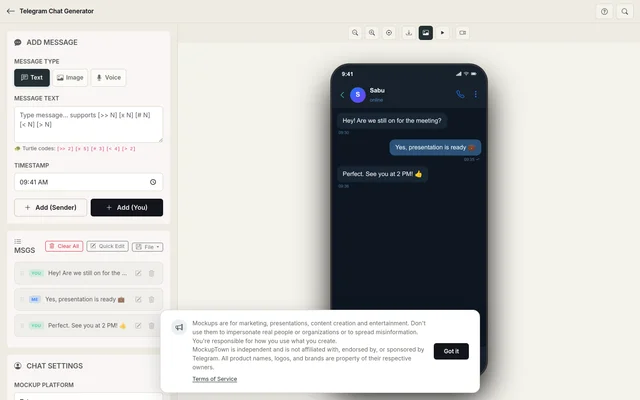 Telegram Chat Generator.
Minimal design, minimal room for error
Telegram's design is the point, and it is also the constraint. Because the interface is so clean, every detail is visible, and every detail has to be right for the mockup to survive a second look:
- The header. The contact name and status sit at the top, and they anchor everything below.
- The bubbles. Rounded, carefully placed, with the lighter background that separates Telegram from denser messengers.
- The input area. The paper-plane icon and the clean input bar are part of the app's identity.
- The color palette. Telegram's specific blue and the light background are what make the app instantly recognizable at a glance.
Matching the tone to the context
Telegram is used for everything from quick chats to technical discussions, and the mockup's tone has to pick a lane. A community announcement thread, a one-to-one technical discussion, and a personal chat all live in the same interface but sound different. The sender toggle makes building any of them straightforward. The believability comes from writing the messages in the tone that matches the scenario you chose.
Writing a Telegram exchange that reads right
- Keep it clean. Telegram's design is minimal, so the content should match: clear, direct messages without clutter.
- Match the tone to the context. A technical group and a personal chat sound different, and the mockup should pick one and stick with it.
- Use the typing pause for emphasis. A pause before an important reply is where the exchange gets its weight, and the typing bubble carries it.
- Alternate the sides naturally. Real Telegram chats alternate senders. Long runs from one side read as a monologue, not a conversation.
- Keep attachments relevant. A file, photo, or link inside the thread works when the messages around it acknowledge it.
Where Telegram mockups earn their place
- Marketing campaigns. Tech products and communities use Telegram-style mockups to show conversations in the channel their audience actually uses.
- Presentations. Projects pitched to technical audiences use Telegram screenshots as a familiar, realistic chat context.
- Content creation. Videos and articles about Telegram, channels, and bots are clearer with a realistic exchange.
- Product launches. Bot and channel launches tease the kind of conversations users will have, before they happen.
- Educational content. Guides on Telegram features and bot design are easier to follow with concrete examples.
The whole build
Here is how it works: select Telegram from the platform picker, set the contact name and profile photo, build the exchange with the sender toggle, set the typing speed and message timing, and export a high-resolution PNG. No uploads, no accounts, just the tool.
An important caveat applies here as always: Telegram mockups are for demonstrations and clearly-marked content. Presenting one as a real conversation with a real person or a real channel, with a real name attached, is the line, and it is easy to check.
If your next deliverable calls for a Telegram screenshot, you can build the exact thread instead of borrowing a real one. Open the Telegram Chat Mockup Generator, choose the Telegram style, write the exchange, and export an animated mockup as a PNG.
Made with MockupTown, the free all-in-one mockup generator.
Frequently asked questions
Is Telegram Chat Generator free to use?
Free of charge - the business model is optional Pro print sizes, not gating the basics behind payment.
Can I use the results commercially?
Commercial use is explicitly fine. No license key, no attribution line, no permission slip required.
Do I need an account?
Registration plays no role here; no field exists anywhere to create credentials in.
What platforms are supported?
ChatGPT threads sit alongside iMessage, WhatsApp, Instagram DM, Messenger, Telegram, Discord, Slack and Twitter DM in the picker.