
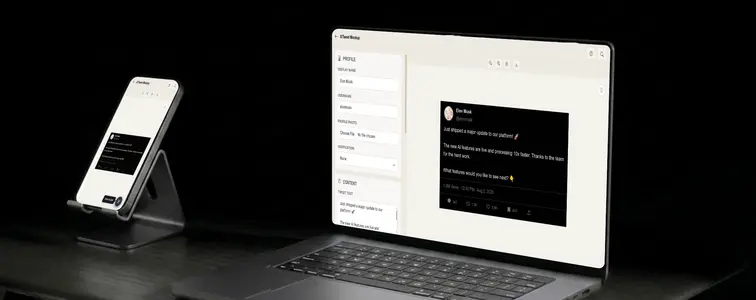
Somewhere in the hero section of nearly every SaaS landing page there is a tweet praising the product. Sometimes it is real. Frequently it is a mockup, because a realistic mockup takes two minutes and nobody has time to chase down an actual quote. The tool has become standard-issue for marketing teams, designers, and presenters alike.
The gap between a tweet that looks real and one that looks planted is narrow, and it is always the same handful of details. The Tweet Mockup Generator in MockupTown gives you control over all of them, but control is only useful if you know what to change.
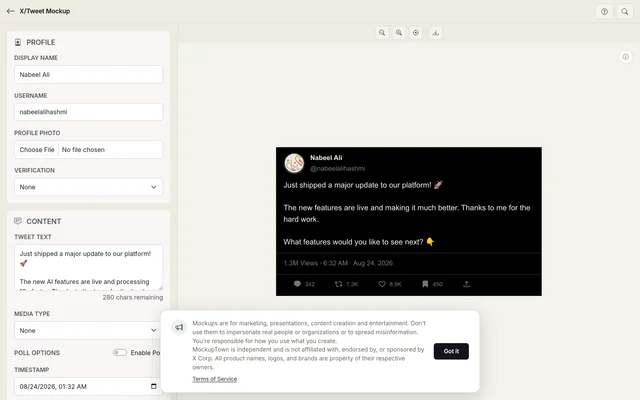 Profile, content, and engagement controls on the left; the live tweet preview on the right.
Where fake tweets get caught
People spot a fabricated screenshot in a split second, even when they cannot articulate why. The tells are consistent:
- The handle does not match the display name.
- The engagement is absurd, like 47 million likes on a three-word post.
- The timestamp is missing or obviously wrong.
- The tweet is one run-on paragraph with no line breaks.
The tool covers each of these, because the point of a mockup tool is that every detail is editable rather than hardcoded. The remaining job is yours: choose values that would not embarrass a real account.
The profile carries the story
The name and avatar above the tweet do most of the realism work. You can upload a profile photo or use the placeholder, and the verification badge offers three real tiers: the blue premium check, the gold organization check, and the grey government check.
Pick the badge deliberately. A gold check on a random username is a giveaway, because gold belongs to established organizations. Match the badge to the kind of account the tweet is supposed to come from, and the whole mockup comes together.
Engagement math matters more than people think
The numbers below a tweet are where plausibility lives or dies. Views, likes, retweets, replies, and quote counts are all settable, and the ratios are the tell.
A tweet with 2.4 million views and 4 likes is a red flag. A handful of likes on a quiet post reads better than a viral count on a tweet nobody saw coming. Scale the numbers to the implied size of the account: a new account with 400k likes is a fabricated screenshot wearing a costume.
Media, polls, threads, and timing
Real tweets carry attachments. The generator supports a single image, a two-to-four image grid, and a poll, plus a timestamp control so the date and time fit the story you are telling.
For longer material there is the thread feature, which chains several tweets into one connected conversation. This is the tool for product launches and tutorial walkthroughs, where one screenshot cannot carry the whole message.
The details that make a second look unnecessary
- Match avatar to name. A corporate display name with a cartoon avatar reads fake instantly.
- Use real timestamp logic. 3am on a Tuesday is fine. A date in the future is not.
- Keep the badge honest. Only use premium, organization, or government when the account type justifies it.
- Break lines. Real tweets use line breaks constantly. Natural breaks look far more realistic than a clean paragraph.
- Check your ratios. Keep engagement in line with what the implied account could actually pull.
Light, dark, and export
The mockup renders in both the light and dark themes the platform actually uses, so you can flip between them and pick the one that fits your context. Export lands as PNG for images and presentations, or SVG for a scalable version that survives print and further editing. The download is instant and requires no account.
One honest note, because these tools get used carelessly: tweet mockups are for concepts, portfolios, and fictional examples. Passing one off as a genuine tweet from a real person tends to end with an awkward screenshot of your own. Keep it on the creative side of that line.
Open the Tweet Mockup Generator, write the tweet, set the profile and the stats, and export a mockup that holds up to a second look.
Made with MockupTown, the free all-in-one mockup generator.
Frequently asked questions
Is X/Tweet Mockup Generator free to use?
Zero cost at every step. Rendering happens locally in your browser, so drafts never touch a server.
Can I use the results commercially?
Yes, and no paid tier gates it. You made the asset; we claim no rights over it.
Do I need an account?
Accounts simply do not feature here. Nothing you enter ever leaves the browser window.
Can I add images and polls to the tweet?
Yes. Attach a single image or a grid of up to four, and optionally turn the tweet into a poll with up to four options and custom percentages.