
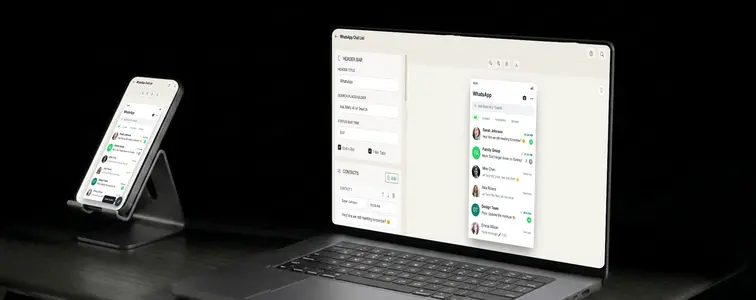
The WhatsApp chat list is the screen nobody designs for and everybody sees. It is the first thing that opens in the app: a column of names, last messages, timestamps, and unread counts. And precisely because it is so mundane, it is one of the most effective places to show a business in context. A list full of customer conversations reads as demand. A specific thread pinned on top reads as an app, a community, or a service people actually use.
The WhatsApp Chat List Mockup Generator in MockupTown builds that exact screen: as many chats as you need, each with its own name, message, time, avatar, and state, exported as a realistic PNG in light or dark mode.
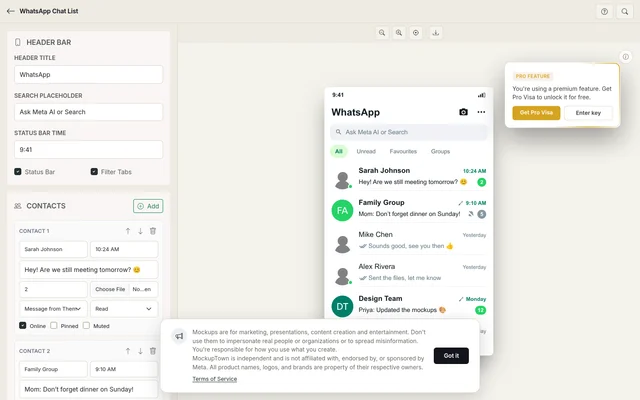 The generator workspace: chat rows on the left, the live inbox preview on the right.
The inbox does the showing
A landing page claiming "customers love us" is a claim. A WhatsApp inbox full of unread customer messages is a display. That is the whole appeal of the chat list as a marketing artifact: it does not say anything, it just shows. The generator reproduces the header bar, search field, filter tabs, and list items from the real app, so the screen is recognized as WhatsApp in the first half-second.
The states are the story
A chat list is a list of states, and the states are where the realism lives. Every chat can be:
- Pinned, to sit at the top and say "this conversation matters."
- Muted, the quiet member of the inbox that keeps it realistic.
- Online, for the contact who happens to be there right now.
- Unread, with a badge count, including the satisfying 99+.
- Tick-marked, with sent, delivered, or read receipts on your outgoing messages.
The mix is what sells it. One pinned group, one unread thread, one online contact: that is a realistic inbox. A screen where everything is pinned and everything is unread reads as a stage set, not a phone.
What makes the list feel real
- Match messages to names. "Mom" should have a casual family line; a work group should show something project-related. The mismatch is what gives mockups away.
- Vary the timestamps. Real inboxes mix "now", "12:45", and "yesterday". Let the times reflect the messages under them.
- Let the ticks tell the tone. If the last message is yours and it is read, the list is quiet. If it is pending, there is implied pressure.
- Use real names. Contacts say "Sara" and "Dev Team", not "Customer #1". A realistic list uses realistic handles.
- Balance the states. Detail in moderation. A couple of badges, a pinned thread, one muted group is plenty.
Building the list
Build it in a few steps: set the header (app title, search placeholder, status-bar time, and whether the filter tabs show), add chats with names, last messages, and avatars, set the states per chat, then toggle light or dark, reorder until the hierarchy is right, and export a high-resolution PNG. Nothing leaves your machine.
Where an inbox screenshot earns its keep
- Marketing campaigns. The strongest use: a chat list full of customer conversations shown directly on a landing page or in an ad.
- Presentations. Show a product generating inbound conversations, or use the list to illustrate a customer journey in a deck.
- Content creation. Tutorials about WhatsApp marketing and lead generation are far clearer with a realistic inbox to point at.
- App demos. For a product with a messaging interface, a WhatsApp-style list communicates the concept instantly without building a UI.
- Newsletters and blogs. A chat list thumbnail is instantly recognizable and pulls readers into a post about messaging.
One honesty note: use these for your own brand, your own content, and clearly-marked examples. Fabricating a chat list for a real person or company to imply a relationship that does not exist is not marketing, and it is easily disproven.
A WhatsApp inbox screenshot comes up more often than people expect, and when it does, you can build the exact list instead of hunting for a real one. Open the WhatsApp Chat List Mockup Generator, add your contacts, set the states, and export a realistic chat list as a PNG.
Made with MockupTown, the free all-in-one mockup generator.
Frequently asked questions
Do I have to pay for WhatsApp Chat List Mockup Generator?
It stays free because computation happens on your device, not on servers someone would have to bill you for.
May I use these in client projects?
Use them however you like. Ads, prints, merchandise - every channel is fine.
Do I have to register first?
Nope. Everything you type stays confined to your own browser window.
How many contacts can I add?
As many as you need. Add unlimited contacts, each with its own name, last message, profile photo, timestamp and state.