
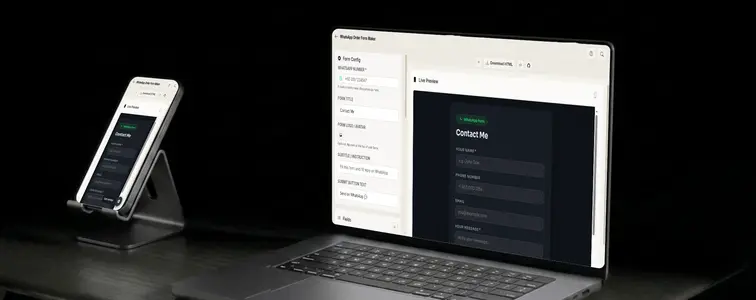
If you run a small business, your customers live in WhatsApp. They message you there to ask about prices, they send photos there, they confirm orders there. And yet most order forms expect them to jump to a website, fill out a dashboard-style form, and wait for an email confirmation.
The WhatsApp Order Form Maker in MockupTown takes the opposite approach. You build a normal-looking web form, and every submission lands in your WhatsApp chat as a neat message. Your customer never leaves the flow they are already comfortable with, and you never set up a backend, a database, or a payment for a form builder.
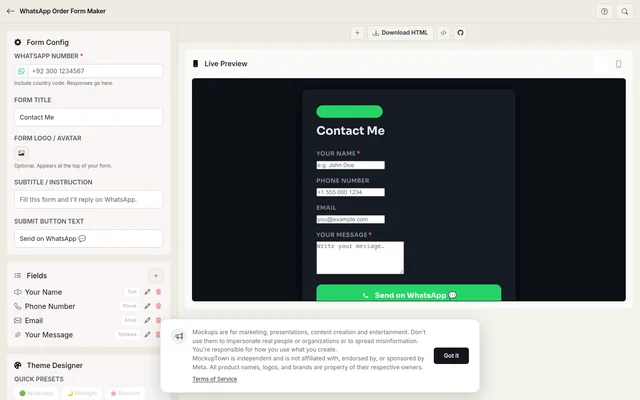 WhatsApp Order Form Maker.
How the delivery works
When someone fills out and submits your form, their answers are arranged into a clean, readable message. The form then opens WhatsApp on their phone with your number already filled in and the message ready to go. All they do is press send.
It is worth being clear about the mechanics, because it is both the strength and the honest limitation. The message is sent by the visitor, from their own WhatsApp, to your number. Nothing is routed through a server in the middle. That means you are not running an email server, paying per submission, or trusting a third-party form service with your leads. It also means the form works anywhere WhatsApp works, which is basically everywhere your customers already are.
The fields that do not lose customers
1. Set up the basics
Open the WhatsApp Order Form Maker and start with the config panel:
- WhatsApp number. The most important field. Include your country code, so +92 300 1234567 and not 0300 1234567. Without the country code, the link will not work for international customers.
- Form title. Something short like "Book a Table" or "Order Enquiry".
- Logo or avatar. Optional, but a small logo at the top makes the form feel like yours instead of a generic template.
- Subtitle and button text. A line like "Fill this in and I will reply on WhatsApp" tells people what happens next. The button text defaults to "Send on WhatsApp".
2. Add your fields
Click the add-field button and build up the form. The field list supports the input types you actually need: text inputs, numbers, dates, dropdowns, and more. For each field you can set the label, a placeholder, and whether it is required.
A few tips from experience:
- Keep the form short. Every extra field is a place where someone gives up. If you only need a name, an item, and a quantity, stop there.
- Use dropdowns for anything with a fixed set of answers, like order types or time slots. They prevent typos, and typos in WhatsApp messages are impossible to search for later.
- Mark the essentials as required so no one sends you a blank order.
3. Make it look like your brand
The theme designer is where the form stops looking like a default template. There are quick presets to start from, including the obvious WhatsApp green, plus Midnight, Blossom, Ocean, Ember, and Chalk. From there you can take over:
- Background type. Solid color, a gradient, or a pattern.
- Card style. Solid, glassmorphism, flat and minimal, or bordered.
- Colors. Everything is customizable with color pickers, and the preview updates live as you change things.
If your business has a recognizable color, use it. A form that matches your brand builds trust before the first question is answered.
4. Preview and share
Flip between desktop and mobile previews to check how it looks, because most of your customers will see it on a phone. Then share it. You get three options:
- Copy the HTML. Paste it anywhere you can drop raw HTML.
- Download the file. A single self-contained HTML file you can host anywhere.
- Deploy to GitHub Pages. The built-in deploy button gives you a free, permanent URL without touching a hosting dashboard.
The whole thing is one static file. There is no server component, so your hosting options are basically anything that can serve a web page, including a free GitHub Pages site.
The jobs it gets used for
- Order forms. Customers pick a product, choose options, and hit send. The order arrives in your chat with everything in one message.
- Lead generation. A simple "tell me what you need" form on a bio link or ad. Responses arrive like a normal chat message, which is far easier to keep up with than an inbox full of form emails.
- Appointments and requests. A booking form where customers pick a date and a slot from a dropdown. No scheduling app required.
- Feedback and surveys. Quick rating questions and comments, without a heavyweight survey tool or a dashboard nobody opens.
- Event registrations. Attendees register by filling a form and sending it, and all the signups sit in one chat thread.
The privacy side
Because there is no backend, your form and its submissions are not stored by the tool. Everything runs in the visitor's browser. The answers never pass through this site, and they only go where the visitor chooses to send them. For a small business that just wants orders in a chat, that is simpler and more private than most "free" form builders, which tend to monetize the data they collect.
The two honest limitations
Two things to keep in mind. First, the visitor has to press send, so you are not getting automatic submissions from people who do not confirm. In practice that is a minor quibble, since anyone who filled out the whole form is usually one tap away from sending it. Second, the visitor needs WhatsApp on their device. That is a non-issue for most of the world, but if you serve a region where WhatsApp is not the default, a plain email form may still be the safer bet.
Five minutes to first submission
If you have been putting off "getting a proper order form" because it sounds like a project, this one takes about five minutes.
Open the WhatsApp Order Form Maker, add your number and fields, pick a theme, and share the link. Your next order could land in your chat within the hour.
Made with MockupTown, the free all-in-one mockup generator.
Frequently asked questions
How does the form reach WhatsApp?
When someone submits the form, their answers are formatted into a message and a WhatsApp link is opened with your number pre-filled. They just press send.
Do I need a backend or server?
No. The generated form is a single HTML file. You can host it anywhere - GitHub Pages, Netlify, or even a local folder.
Is my data private?
Yes. Your form content and submissions are not stored by the tool. Everything runs in the visitor's browser.
What field types are available?
You can add short text, long text or message, email, phone and number fields, each with its own label, placeholder and required setting.