
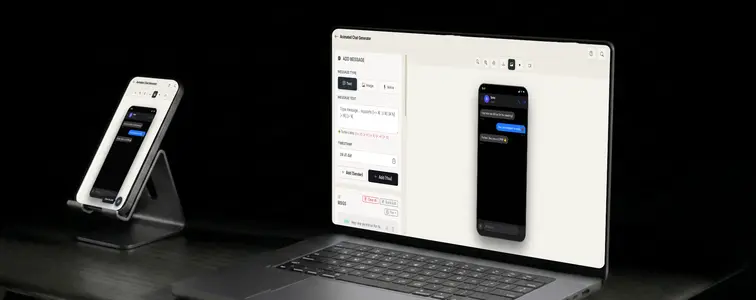
The WhatsApp screenshot is the most-used chat mockup in marketing, and its animated version is the most-used one in short-form video. There is a reason both exist: WhatsApp is where customer conversations actually happen, so a realistic exchange is the most persuasive way to show a business talking to its customers.
The static screenshot has a ceiling. It cannot show what makes a chat feel alive: the message arriving, the typing dots appearing, the reply landing. An animated conversation crosses that line, and the WhatsApp Chat Mockup Generator in MockupTown is built around it: realistic WhatsApp rendering, plus a typing indicator that turns a static conversation into something you play back and capture as video.
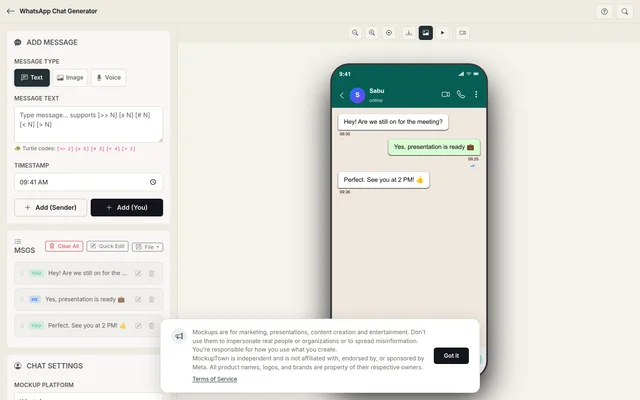 WhatsApp Chat Generator.
The typing dots are the whole trick
Animation is not what you think it is here. It is not flying text and zoom effects. The realism comes from one detail: the pause before a reply. The contact is set to "typing", the three dots appear and pulse, and then the message lands. That beat is what separates an image from a conversation, and it is the reason the generator exposes the typing indicator as a first-class control instead of a decoration.
Everything else supports it. The contact name and profile photo anchor the exchange to a real-looking person. The message builder handles the back-and-forth with a sender toggle. The green and white bubbles carry the platform's actual color treatment, and the dark theme matches the app as it exists today.
Writing a conversation that moves well
An animated chat is judged by ear as much as by eye, because pacing is now part of the message. The rules shift accordingly:
- Write like a texter. Short messages, occasional informality, realistic response lengths. Long paragraphs in a bubble read as fake instantly.
- Script the pauses. The typing indicator is a beat, not an afterthought. Put it before the replies that matter and let it build.
- Alternate the sides. Real conversations go back and forth. Long runs from one side read as a monologue.
- Match contact to story. A support conversation and a sales conversation need different kinds of names and tones.
- Pace it like a chat, not a slide deck. Messages arrive in bursts with natural pauses, the way people actually respond.
Where animated WhatsApp videos land
- Short-form marketing. Animated exchanges stop the scroll in a way a screenshot cannot, which is why they dominate social content about customer conversations.
- Presentations. A deck that shows a support conversation unfolding is more effective than a slide that describes one.
- Content creation. Videos about WhatsApp marketing, customer service, and small business tips use the animation as their centerpiece.
- Product launches. Teasers show the conversations customers will have, with the typing dots building anticipation.
- A/B testing. Compare two scripts, two phrasings, or two pacing options side by side to see which reads better.
The workflow
The process is straightforward: set the contact, write the messages with the sender toggle, mark the replies that deserve a typing pause, then play the conversation back at your chosen pace. The mockup exports as a high-resolution PNG, and the playback is designed for recording into video. Nothing leaves your machine.
Worth mentioning: this applies in video form even more strongly than in static, because moving video is more compelling: these are for demonstrating your own business and clearly-marked content. Passing an animated exchange off as a real conversation with a real person is the line, and it is easy to check.
If your next deliverable calls for a WhatsApp conversation that moves, you can build and animate it instead of recording a real one. Open the WhatsApp Chat Mockup Generator, set the contact, write the exchange, and use the typing indicator to bring it to life. Export the mockup as a PNG or capture the playback for video.
Made with MockupTown, the free all-in-one mockup generator.
Frequently asked questions
Do I have to pay for WhatsApp Chat Generator?
Completely free since launch. Skipping the paid tier loses nothing this guide depends on.
May I use these in client projects?
You own what you export, full stop. Ads, social posts, client deliverables, resale of your own designs.
Do I have to register first?
There is nothing to register for. Close the tab and no trace remains anywhere except your own downloads folder.
What platforms are supported?
The picker covers iMessage, WhatsApp, Instagram DM, Messenger, Telegram, ChatGPT, Discord, Slack and Twitter DM - nine formats in total.