
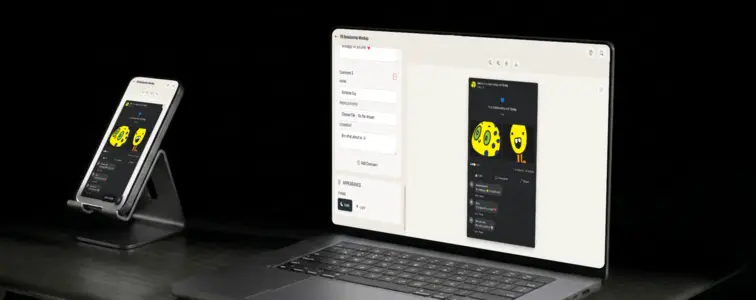
Nobody scrolls past a relationship status update. The format is tiny, but it carries a lot: two photos, a heart, a status line, comments, and reaction counts, all squeezed into a card people recognize instantly. That instant recognition is why a fake Facebook relationship status shows up everywhere - in pranks, in memes, in engagement announcements, and in friend-group inside jokes that only make sense once you see the pairing.
The Facebook Relationship Mockup Generator in MockupTown, a free in a relationship status generator, turns the whole format into a form. Upload two photos, type two names, pick a status line, add a few comments, and you have a fake Facebook relationship status that reads like the real thing instead of like a rushed edit.
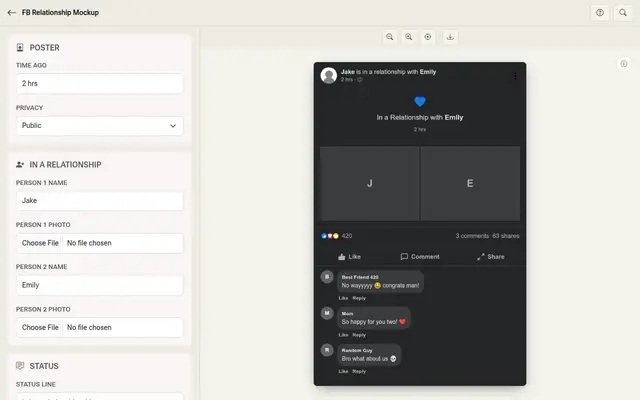 Facebook Relationship Mockup Generator.
What makes the format work
A relationship status post is a prank in one card. Unlike a text post, it does not ask you to write anything long. It asks you to put two faces side by side and let everyone else supply the reaction. That is why the pairing is the whole joke: the more unexpected the two photos look together, the funnier the result.
The status line does the heavy lifting after that. "Is in a relationship with", "is engaged to", "it's complicated" - each phrase changes the tone completely. The same two photos read as heartwarming with one line and as a punchline with another.
Two photos, then the story
Start with the two photos, because they anchor everything. Use clear, face-forward images so the pairing is obvious at a glance. The generator puts them side by side with the status line above, the same way a real Facebook post lays it out.
Then the names and the status line. The names are what make it personal, and the status line sets the tone. Swap "is in a relationship with" for "is engaged to" and the joke shifts from a surprise to a proposal teaser.
Then the comments. This is where a fake post stops looking fake. Real posts have friends reacting, family members celebrating, and at least one person taking the whole thing far too seriously. Add a couple of those and the card reads as lived-in instead of staged.
The build in practice
Upload the two photos, type the two names, and choose or write the status line. Add comments from the friends, family and strangers who would absolutely have something to say, then set the reaction and share counts so the numbers feel believable for the account. Pick dark or light mode to match the look you want, preview, and export a high-resolution PNG. The browser does all the work and nothing leaves your device.
The details that keep it convincing
- Pick a believable pairing. The joke lands hardest when the mismatch is obvious but the photos still look like they belong on a real profile.
- Match the comments to the audience. A mom comment, a best-friend comment and an unhinged stranger comment cover the full range of a real relationship announcement.
- Scale the engagement to the account. Two best friends getting 400 reactions is plausible; two strangers getting 400 is a giveaway.
- Use a real-ish timestamp. "Just now" on a post that looks days old reads wrong. Match it to the story.
- Keep the status line on tone. The same faces read completely differently across "engaged" and "it's complicated", so pick the line that sells the joke.
Where a relationship mockup earns its place
- Prank your friends. The classic use, and the one that first impressions are made of.
- Engagement and wedding teasers. Announce a real engagement with the format before the official post.
- Meme and content creation. A caption-ready relationship post is a staple for pages and creators.
- Inside jokes. The pair-up that only makes sense to the group that shares it.
- Mockups and demos. Illustrate social features or Facebook-style layouts in a design or tutorial.
A quick word on honest use. Mockups are for pranks and illustration among people who know they are mockups. Passing one off as a real post from a real account is not the idea, and the joke stops being funny the moment someone thinks it is real.
The post you need, in one pass
When you need a relationship status post you can ship instead of scrape together, the generator gets you there in one pass.
Open the Facebook Relationship Mockup Generator, pick two photos and two names, set the status line and the comments, then export the mockup in the theme your story needs.
Made with MockupTown, the free all-in-one mockup generator.
Frequently asked questions
Do I have to pay for the fake Facebook relationship status generator?
The free tier carries the full workflow; Pro only adds bigger canvases for print use.
May I use these in pranks and projects?
Use them for pranks, memes and illustration freely. The one thing you may not do is present them as genuine platform screenshots.
Do I have to register first?
No. The editor is already live when the page loads.
Can I change the photos and comments?
Yes. Upload both photos, and give every comment author their own name and profile photo, so the whole card feels real.