
iMessage is the text message. When a brand wants to show a customer conversation that feels personal and immediate, iMessage is the format it reaches for, because everyone with an iPhone knows exactly what those blue bubbles mean. No other chat screen carries the same weight of casual, real-person communication.
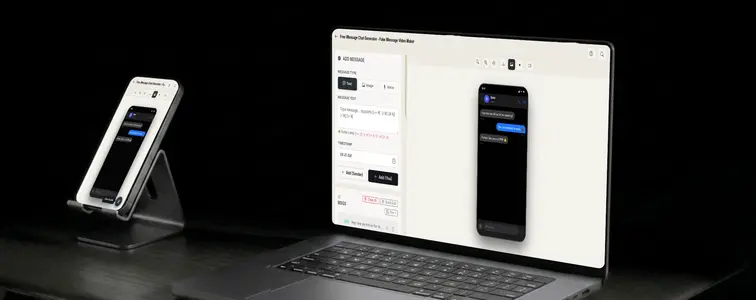
It is also one of the hardest chat interfaces to fake well, because the details are so specific: the blue bubble for your side, the white or gray for the other, the way messages group together, the three-dot typing indicator inside the bubble. Get one of those wrong and it stops reading as iMessage. The iMessage Chat Mockup Generator in MockupTown reproduces the Apple styling and animates the exchange, so the mockup looks like it was sent from a real Messages thread.
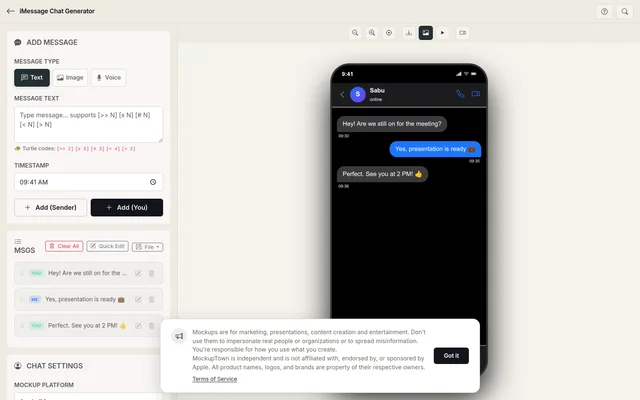 iMessage Chat Generator.
Why iMessage reads as "the real one"
iMessage has a cultural weight the other formats do not. It is the private, personal channel, the one where people actually text their people. A mockup in this format inherits that:
- It is the default mental image of a text conversation.
- It reads as personal and immediate, the opposite of a broadcast.
- It is the format sales and support teams reach for when showing what good customer communication looks like.
The details that define the format
The believability lives in specific, unforgiving details:
- Blue versus white bubbles. The blue is always your own sent messages; the other side is white or gray. Keep the toggle correct for whichever side the viewer is supposed to identify with.
- Message grouping. Real iMessage conversations group consecutive messages from the same sender. That grouping is part of the look.
- The three-dot indicator. It appears inside its own bubble, and it is the single most iconic iMessage detail. Script it in before the replies that matter.
- The header. The contact name and the app's characteristic layout frame everything.
Writing a thread that sounds like texting
iMessage conversations are the most casual of all chat formats, and the writing has to match:
- Keep it short. iMessage is built from short messages, not paragraphs. Long texts on iMessage look unusual for a reason.
- Write like two different people. The two sides should have distinct voices, with different sentence lengths and habits. That is what makes a thread feel lived-in.
- Let the pauses breathe. The three-dot indicator is part of the identity. Use it before the replies that carry weight.
- Embrace the small stuff. Single-word responses, the occasional dropped letter, a reaction instead of a reply. Real texting is messy.
- Keep attachments relevant. A photo or link works only if the conversation acknowledges it.
Assembling the thread
The steps are simple: pick iMessage from the platform picker, set the contact name and profile photo, write the exchange with the sender toggle, adjust typing speed and timing, and export a high-resolution PNG. All processing happens on your device.
The places it fits
- Marketing campaigns. Customer-conversation mockups for landing pages and ads are almost always iMessage-style, because it reads as personal and immediate.
- Presentations. Sales and support teams use iMessage mockups in decks to show what great customer communication looks like.
- Content creation. Skits, testimonials, and social content use iMessage screenshots as the universal shorthand for a text conversation.
- Product launches. Teasing a feature by showing how people will talk about it, in the most personal chat format there is.
- Educational content. Guides on texting best practices, customer service, or SMS marketing are clearer with a realistic thread.
A note on proper use: is the same as every chat mockup: these are for demonstrating, selling, and creating content. Passing an iMessage mockup off as a real conversation with a real person, especially one who never had it, is the line, and it is easy to expose.
Whenever a an iMessage screenshot would help tell the story, you can build the exact conversation instead of borrowing someone else's. Open the iMessage Chat Mockup Generator, choose the iMessage style, script the bubbles with typing pauses, and export an animated mockup as a PNG.
Made with MockupTown, the free all-in-one mockup generator.
Frequently asked questions
Do I have to pay for iMessage Chat Generator?
No charge - not for building, not for exporting. Exports carry no watermark and there is no daily cap.
May I use these in client projects?
Cleared for commercial work from day one. Teams drop these exports into investor decks and ad creative constantly.
Do I have to register first?
None. There is no signup form or OAuth prompt anywhere - you land directly on the canvas.
What platforms are supported?
You get iMessage plus eight more - WhatsApp, Instagram DM, Messenger, Telegram, ChatGPT, Discord, Slack and Twitter DM.