
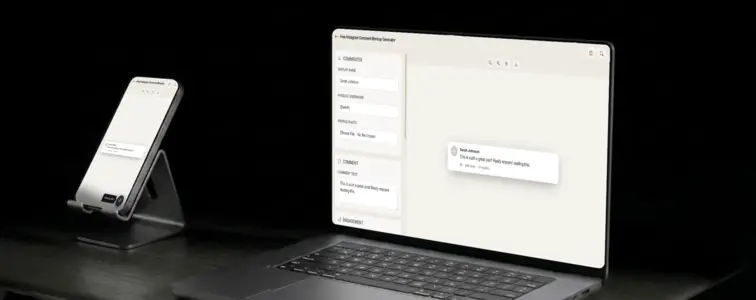
Instagram comments are clean, minimal, and instantly recognisable. The small circular profile picture, the bold username, the like count next to a heart icon, the reply link. The entire design communicates simplicity and visual focus, which is exactly what Instagram's brand is built on. When someone sees a comment card in Instagram styling, they immediately think of a visual social platform where engagement is measured in hearts and short, punchy replies.
That is what makes an Instagram comment mockup valuable. When you are building marketing materials, designing a pitch deck, or creating content that needs to feel native to the Instagram ecosystem, the comment format communicates platform context without any additional explanation. The problem is that building a convincing Instagram comment card by hand is tedious, because the details are specific and the design has a particular aesthetic that is hard to replicate. The Instagram Comment Mockup Generator in MockupTown renders the actual layout, so your mockup looks like it belongs on the platform.
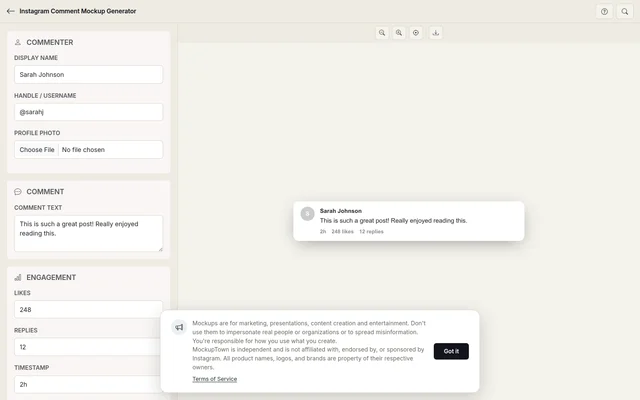 Instagram Comment Mockup.
Why Instagram comments feel different
Instagram comments are not like YouTube comments or Reddit threads. They are shorter, more visual, and more personal. People comment on Instagram posts with emojis, short reactions, and direct messages to the creator. The comment section feels like a conversation, not a discussion board.
The design reflects this. Instagram's comment layout is compact: the profile picture is small (32 pixels), the username is bold but not oversized, and the like count uses a tiny heart icon rather than a thumbs-up. The reply link is understated, appearing as a small grey text link rather than a button. Each element is designed to feel lightweight and unobtrusive, matching Instagram's overall philosophy of visual-first communication.
The anatomy of an Instagram comment
An Instagram comment has a specific structure that the generator reproduces accurately:
- The profile picture. A small circular avatar on the left. Instagram uses 32-pixel avatars in comments, which is smaller than most other platforms. This keeps the focus on the text.
- The username. Bold text next to the avatar. Instagram usernames do not have display names in comments, just the handle.
- The verified badge. An optional blue checkmark that appears next to the username for verified accounts. On Instagram, the badge is a simple icon, not a text label.
- The comment text. The main body of the comment, in a clean sans-serif font. Instagram comments tend to be shorter than other platforms.
- The meta row. Below the comment text, showing the timestamp, like count, and reply link. These are displayed in a single line with small grey text.
The like count format matters
Instagram displays like counts differently than other platforms. Instead of showing a number next to a thumbs-up icon, Instagram shows the number followed by the word "likes" in small grey text. For example: "248 likes" rather than "248" with an icon. This subtle difference is part of what makes an Instagram comment look genuine.
The generator handles this automatically, but it is worth understanding why it matters. A comment that shows "248" next to a thumbs-up icon is a YouTube comment. A comment that shows "248 likes" in small grey text is an Instagram comment. The format is part of the identity.
The details that make it look like a real Instagram comment
- Keep the avatar small. Instagram uses 32-pixel avatars in comments, not 40 or 48. This is one of the most common mistakes in hand-built mockups.
- Use the right font. Instagram uses the system font stack: -apple-system, BlinkMacSystemFont, "Segoe UI", Roboto. The generator handles this.
- Format the like count correctly. Show the number followed by "likes" in grey text, not an icon with a number.
- Make the reply link subtle. Instagram's reply link is small grey text, not a button or a bold link.
- Keep comments concise. Instagram comments tend to be shorter than YouTube or Reddit comments. A three-sentence comment reads as natural on Instagram.
Where an Instagram comment mockup earns its place
- Marketing materials. Brands and agencies use Instagram comment mockups to show what audience engagement could look like. The format is instantly recognisable to anyone who uses the platform.
- Pitch decks. When presenting to sponsors or partners, showing realistic Instagram comment engagement demonstrates the potential for community interaction. The visual is more compelling than a slide full of metrics.
- Content strategy documents. Social media managers use comment mockups to illustrate engagement strategies, response templates, or community management workflows.
- Blog posts. Articles about Instagram marketing, influencer partnerships, or social media trends benefit from realistic comment visuals.
- Educational content. Courses on social media marketing use Instagram comment mockups to teach students about platform-specific engagement without using real users' data.
Remember: is important: comment mockups are for presenting your own work, designing marketing materials, and illustrating concepts. Using them to mislead audiences about community sentiment crosses a line that is not worth crossing.
Building an Instagram comment in two minutes
Open the Instagram Comment Mockup Generator, enter the commenter name, profile photo, comment text, like count, and timestamp. Toggle the verified badge on or off. Pick light or dark mode. Export as a high-resolution PNG. No server involved, everything is local.
The generator uses the actual Instagram comment layout, with the correct font sizes, the accurate like count format, and the proper spacing. The result looks like a screenshot from a real Instagram post, not a hand-built approximation.
When your project needs an Instagram comment visual, you can build the exact card instead of describing one in text. Open the Instagram Comment Mockup Generator, set the details, and export a mockup that looks like it belongs on the actual platform.
Made with MockupTown, the free all-in-one mockup generator.
Frequently asked questions
Can I show @ mentions in the comment?
Yes. Type @ followed by a username in the comment text. The mockup renders it in Instagram's blue mention style.
Does it support the red heart reaction?
Yes. The heart reaction, the red heart that appears when someone double-taps a comment, is a toggle in the engagement settings.
Can I mock up a reply from the post author?
Yes. Set the commenter as the post author and the mockup shows the "OP" or author indicator that Instagram displays on original poster replies.
Will it render comment threading correctly?
Yes. Reply threads use Instagram's nested reply format with proper indentation.