
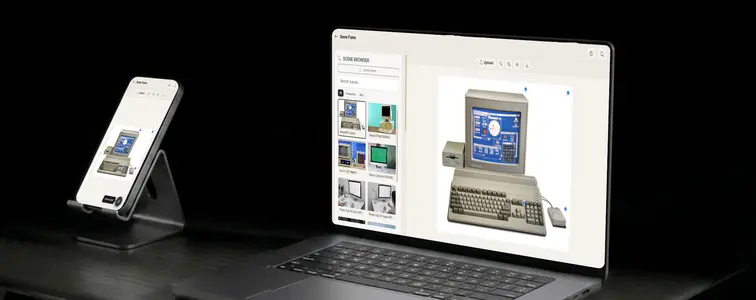
Every tool has a moment when the small details stop matching what your eye tells you: a crop that lands slightly off, a fold across the screen where there should be a flat surface, hairline seams that only show up in the final export. This post walks through the latest update and bug-fix pass on the free, browser-based Scene Frame Generator. The fixes matter beyond any changelog, because this tool is a mini version of Arkida running in your browser, and what happens on this page is a taste of Arkida's full engine.
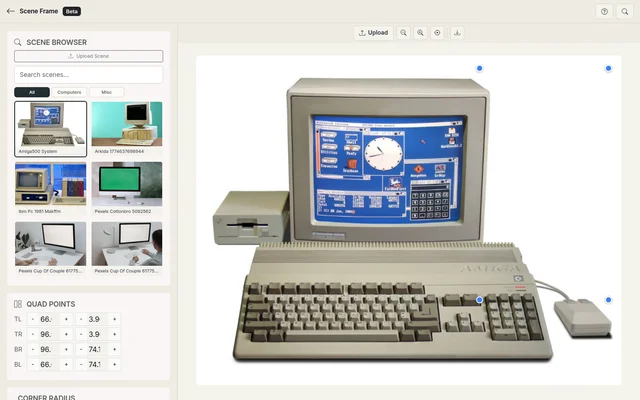 Scene Frame Generator.
A free mini version of Arkida
The Scene Frame Generator is a no-install slice of Arkida. You pick a scene, map your design into the screen with four corner handles and real perspective, tune fit, position, zoom, opacity, and corner radius, then export a high-resolution PNG. Same engine idea, distilled into one page. Arkida itself is far bigger, and the whole point of this update pass is that the fixes below are the shallow end of a much deeper pool.
What is Arkida?
Arkida is a creative tool built by Nabeel Ali Hashmi that runs as a browser extension for Chromium-based browsers. It turns screenshots and images into professional product shots, scene mockups, and presentation-ready visuals: your app screenshot mapped into an angled monitor, a phone held at an angle, or a billboard in a real photograph. Perspective warp, scene occlusion, AI lighting, and batch export let you produce polished results in bulk. Everything runs locally, nothing leaves your machine, and no account is required. The Arkida product page walks through the entire feature list.
The heart of Arkida is its perspective and camera work: a homography engine that keeps imagery crisp at any warp angle, and a 4-point perspective tool that maps content onto any angled surface. The pieces the web tool exercises, the homography mapping and the quad handles, are the exact pieces Arkida was built around.
Why the update happened
The Scene Frame Generator has been the workhorse mockup tool on this site, and it had a set of quality problems that only show up after you have used it a few times:
- Content was being plain-cropped into a rectangle instead of following a scene's perspective. On straight-on scenes it was acceptable; on photographed scenes it looked wrong.
- The perspective warp used just two triangles, which produced creases that made a flat screen look like cloth folded along a diagonal.
- Hairline seams appeared between the triangles of the warp, in both the preview and the exported PNG.
- The four corner handles sat on top of the preview permanently, and the previously uploaded content lingered on screen after a new design was uploaded.
- Exports were captured as an upscaled screenshot of the preview, so a browser-sized preview produced a soft, low-resolution export.
The update pass fixed each of these. Here is what changed.
Perspective mapping instead of cropping
The biggest behavioral fix: mapping. Previously the tool placed content by clipping a rectangle into the quad area, which read as "angling a cropped image" rather than "this content lives on this screen." The mapping is now a true homography, the mathematical perspective transform that maps your flat content onto a quadrilateral plane. Place the four corners on a photographed monitor, and straight lines in your design stay straight on the monitor while converging toward the scene's vanishing points, because the transform is computed per-pixel from the actual corners rather than approximated by a crop.
A fine mesh instead of two triangles
The first attempt at true perspective used two triangles to cover the quad, and that is where the "cloth" artifact came from. Two large triangles share one diagonal, and the warp across that diagonal goes in slightly different directions on each side, producing a visible crease through the screen.
The fix is a 16 by 16 mesh: the quad is divided into a grid of hundreds of small triangles, each individually perspective-correct, so the whole surface bends smoothly like a true flat plane. A cloth effect needs a crease; a fine mesh has no seam large enough to crease.
No more hairline seams
Meshes solve the fold problem but introduce a new one: every triangle in a mesh has an anti-aliased edge, and when hundreds of triangles tile a screen, those edges can show up as fine lines, a faint web across your content in the preview and in the export. The fix borrows directly from Arkida's texture-mapping approach: draw each triangle slightly over-sized, fanning out past its own boundary by a couple of pixels, so neighboring triangles overlap instead of meeting at a gap. On the exported image this makes the mesh effectively invisible. The mesh also renders at whatever resolution the current canvas is, so the same code path serves the preview and the high-resolution export alike.
Handles that get out of the way
The four corner handles, which set the perspective quad, were previously always visible, sitting across the composition. They now stay hidden until you move your cursor over the scene, at which point they fade in, and they grow slightly while being dragged. The composition stays clean until you actually need to nudge a corner, and the handles remain reachable for fine adjustments on top of the numeric inputs.
The last upload no longer lingers
A classic and annoying bug: after uploading design A and then design B, design A could stay frozen on the canvas. This was a stale-reference bug in the upload handler, where the previous image was never cleared before the new one finished loading. New uploads now reset the content state cleanly, so the canvas paints exactly what you most recently chose.
High-resolution export that is actually high resolution
Exports previously captured the on-screen preview element and scaled it up by two. Because everything was already rendered at preview resolution, a 2x scale just doubled soft pixels; the closer you looked, the worse it got. The export now re-renders the entire composition, scene and mapped content, from the original source images at up to 2400 pixels on the long edge, with high-quality image smoothing. A scene that fills the browser window comfortably now exports a PNG that holds up in a deck, a client email, or a print layout. This matters most for the perspective-mapped content, which is resampled during the warp and benefits directly from being recomputed at export resolution rather than stretched.
Click-to-detect: pick a point, get a quad
Screen detection in the tool had always been automatic, and it is good, but a busy scene can fool any automatic algorithm. This update adds a manual assist in the style of Arkida's editor: a Click-to-detect tool in the toolbar. Switch it on and click anywhere inside the screen in your scene. The tool flood-fills the connected region around your click, then fits the result with a convex hull and returns the four corners. While you are picking, the mapped content is hidden so you can see the real scene, and the cursor becomes a crosshair.
Two details make this more than a rectangle finder. First, the flood-fill uses an adaptive tolerance based on the local texture where you clicked, so smooth screens get a tight boundary while grainy screens do not stop at the first bit of noise. Second, it returns a quadrilateral, not a rectangle, because a screen in a photograph is almost never axis-aligned; a monitor shot from the side is a trapezoid, and a phone held at an angle is a full perspective quad. Where the quad is not recoverable, the tool falls back to the best axis-aligned box, and you can still drag the four handles afterward.
A small default change
Content defaults to Fill mode now instead of Cover, which better matches how most scene mockups are built, and you can switch between Fill, Fit, and Cover whenever you prefer.
The result
The Scene Frame Generator is now a far more honest piece of software: content sits on the scene using actual perspective math, the surface stays flat and clean, and the export is a genuine high-resolution render, not a magnified preview. Every one of those fixes, the homography, the mesh, the seed-point detection, traces straight back to Arkida's engine. This is a mini version of Arkida, and it behaves like one.
This is the mini. The full engine is Arkida.
Everything the web tool does, Arkida does inside a browser extension, and then it goes far further:
- 3D rotation and perspective warp. Tilt a mockup on X and Y axes, then map it with the same 4-point tool onto any monitor, tilted phone, or real-world surface.
- A built-in device library. iPhones, Androids, tablets, laptops, monitors, and browser-style frames, all vector SVG and razor-sharp at any resolution.
- Scene occlusion. Content sits behind real objects in a photo: a hand, a finger over the screen, a coffee cup in front of a laptop.
- AI surface glare and environment glow. Realistic glass reflections on the screen and light spilling onto the device body.
- Stackable artistic filters. Layer looks from clean and corporate to cinematic and moody.
- Cloud scene sourcing. Find millions of royalty-free photos from Unsplash, Pexels, and Pixabay without leaving the tool.
- Frame effect layers. Shadow overlays and adjustable blur for depth and focus.
- A custom frame creator. Chroma key removal, a manual eraser, AI screen boundary detection, SVG import, and reusable .arkframe files you can share.
- Online frame repositories. Expand your frame library from official and community sources.
- Export and batch. PNG, JPG, or WebP at adjustable quality, transparent backgrounds, batch processing with ZIP, and one-click capture of all open tabs.
All of it local and private, free to install, with an Arkida Plus tier for the AI lighting, filters, and batch power.
Try the mini first
The fastest way to understand Arkida's engine is to feel it in the browser. Open the Scene Frame Generator, pick a scene or upload your own, drop in your content, and map it with the four corners. When a single flat screen is not enough and you want angles, occlusion, lighting, and bulk output, the full engine is waiting in Arkida.
Made with MockupTown, the free all-in-one mockup generator.
Frequently asked questions
Does Scene Frame Generator cost anything?
No. It is free to use in the browser, no account, no credit card. Arkida is also free to install, with an optional Plus tier for the AI lighting, filters, and batch features.
What is this tool's relationship to Arkida?
Scene Frame Generator is a free mini version of Arkida running in the browser. Arkida is the full product: a browser extension with 3D rotation, perspective warp, scene occlusion, AI lighting, filters, cloud sourcing, and batch export. The web tool lets you try the core mapping, after which Arkida takes over.
How does the new Click-to-detect work?
Switch on Click-to-detect in the toolbar, then click anywhere inside the screen of your scene. The tool flood-fills the region around the click, fits a perspective quadrilateral to it, and sets the four corners of your content area automatically.
How good is the export now?
The export re-renders the full composition from the original source images at up to 2400 pixels on the long edge, instead of upscaling a screenshot of the preview, so the perspective-mapped content stays sharp.
Does the editor still detect screens automatically?
Yes. The four automatic detection algorithms remain, and Click-to-detect is a manual complement for scenes where auto-detection misses; corner handles let you fine-tune either result.