
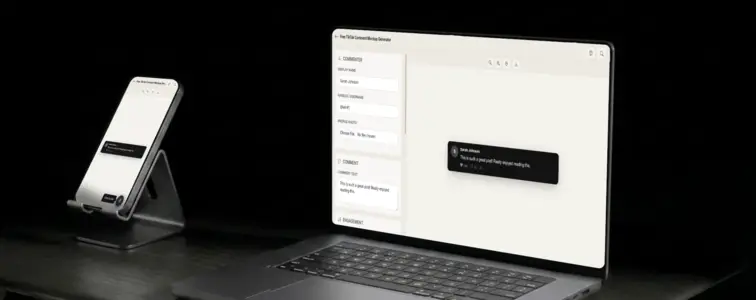
TikTok comments are dark, bold, and designed for speed. The dark background, the bright white text, the large profile pictures, the red pinned comment indicator. When someone sees a comment card in TikTok styling, they immediately think of short-form video, viral content, and the kind of engagement that happens in real time. The comment section on TikTok is not a place for long discussions. It is a place for quick reactions, inside jokes, and the kind of spontaneous community interaction that makes the platform feel alive.
That is what makes a TikTok comment mockup valuable. When you are building UGC ad creatives, designing pitch decks for TikTok campaigns, or creating content that needs to feel native to the platform, the comment format communicates a specific kind of energy. The problem is that building a convincing TikTok comment card by hand is tedious, because the dark theme and specific design details are hard to replicate. The TikTok Comment Mockup Generator in MockupTown renders the actual layout, so your mockup looks like it was pulled straight from the app.
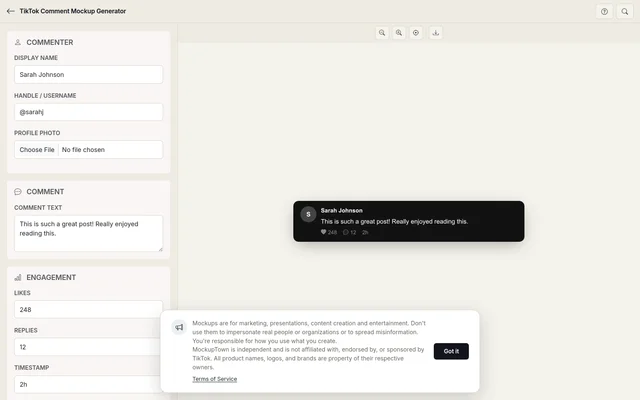 TikTok Comment Mockup.
Why TikTok comments feel different
TikTok's comment section is unique because it is designed for mobile-first, short-form interaction. The comments appear as a slide-up panel over the video, with a dark background that matches the video player. The design is compact and vertical, with profile pictures, usernames, and comment text stacked tightly. The like count uses a heart icon rather than a thumbs-up, and the reply count uses a chat bubble icon.
The dark theme is part of the identity. TikTok is a dark-mode-first platform, and the comment section reflects that. A TikTok comment mockup that uses a light background immediately feels wrong. The generator defaults to dark mode for TikTok, matching the actual app experience.
The anatomy of a TikTok comment
A TikTok comment has a specific structure that the generator reproduces accurately:
- The profile picture. A circular avatar on the left, slightly larger than Instagram's but smaller than YouTube's. TikTok uses 36-pixel avatars in comments.
- The username. Bold white text next to the avatar. TikTok usernames do not have display names in comments, just the handle.
- The verified badge. An optional blue checkmark that appears next to the username. On TikTok, the badge is a small icon, similar to Instagram.
- The pinned indicator. An optional red label that appears above the comment text when the comment has been pinned by the creator. This is one of TikTok's most distinctive comment features.
- The comment text. White text on a dark background, in a clean sans-serif font.
- The meta row. Below the comment text, showing the like count with a heart icon, the reply count with a chat bubble icon, and the timestamp.
The pinned comment is TikTok's engagement signal
TikTok's pinned comment feature is one of the platform's most distinctive design elements. When a creator pins a comment, it appears at the top of the comment section with a red "Pinned" label. This is TikTok's way of highlighting the most important or entertaining comment, and it carries significant weight because it represents the creator's curation of the conversation.
The pinned comment is especially important for UGC ad creatives. When a brand wants to show that their TikTok content is generating positive engagement, a pinned comment with a high like count communicates that the creator noticed and valued the community response. The generator lets you toggle the pinned indicator on or off, so you can show the difference between a regular comment and one that has been pinned by the creator.
The details that make it look like a real TikTok comment
- Use the dark theme. TikTok comments are almost always displayed on a dark background. A light theme exists but is rarely seen. The generator defaults to dark mode for TikTok.
- Make the avatar 36 pixels. TikTok uses 36-pixel avatars in comments, which is between Instagram's 32 and YouTube's 40.
- Use heart icons for likes. TikTok uses hearts, not thumbs-up. This is one of the most obvious visual differences between platforms.
- Add the pinned indicator when appropriate. Pinned comments are common on TikTok, especially on viral videos. Use them to add a sense of realism.
- Keep comments short. TikTok comments tend to be brief and punchy. A one-liner reads as more natural than a paragraph.
Where a TikTok comment mockup earns its place
- UGC ad creatives. The most common use: showing what audience engagement looks like in TikTok-style ads. Brands and agencies use comment mockups to demonstrate community response to campaign content.
- Pitch decks. When presenting TikTok marketing strategies to clients or partners, realistic comment engagement visuals demonstrate the platform's potential. The dark theme and specific design elements make the mockup instantly recognisable.
- Content strategy documents. Social media managers use TikTok comment mockups to illustrate engagement strategies, response templates, or community management workflows specific to the platform.
- Blog posts. Articles about TikTok marketing, short-form video trends, or creator economy benefit from realistic comment visuals.
- Educational content. Courses on social media marketing use TikTok comment mockups to teach students about platform-specific engagement patterns.
Before you export: is important: comment mockups are for presenting your own work, designing ad creatives, and illustrating concepts. Using them to mislead audiences about community sentiment crosses a line that is not worth crossing.
Building a TikTok comment in two minutes
Open the TikTok Comment Mockup Generator, enter the commenter name, profile photo, comment text, like count, and timestamp. Toggle the verified badge and pinned indicator on or off. Export as a high-resolution PNG. The browser does all the work.
The generator uses the actual TikTok comment layout, with the dark theme, the correct avatar size, heart icons for likes, and the pinned indicator. The result looks like a screenshot from a real TikTok video, not a hand-built approximation.
When your project needs a TikTok comment visual, you can build the exact card instead of describing one in text. Open the TikTok Comment Mockup Generator, fill in the commenter specifics, and export a mockup that looks native to the platform.
Made with MockupTown, the free all-in-one mockup generator.
Frequently asked questions
Can I mark a comment as pinned?
Yes. Toggle the pinned status and the mockup shows the pin indicator, matching how TikTok highlights creator-pinned comments at the top of the section.
Does it show the creator badge?
Yes. The creator badge, the small marker next to the creator's name, appears automatically.
Is the dark theme the default?
Yes. TikTok is primarily a dark-themed app, so the mockup loads in dark mode by default. You can still switch to light mode if needed.
Can I show comment likes in TikTok's format?
Yes. The like count uses TikTok's bold formatting and heart icon.