
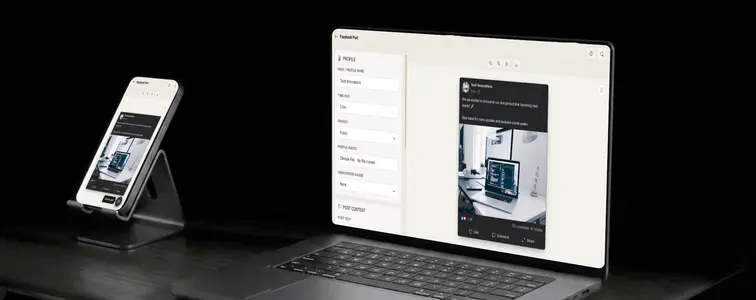
Facebook is the social network people love to write about, and the screenshots keep getting used in content: in agency case studies, in social media strategy decks, in blog posts about engagement. A good Facebook post screenshot is dense with detail, which is exactly why faking one by hand is tedious.
There are the reaction counts, the comment numbers, the share count, the timestamp, the like row that shows the little faces. Get one detail wrong and the whole image reads as obviously fake. The Facebook Post Mockup Generator in MockupTown handles all of it, so you can produce a screenshot that holds up under the kind of glance it will actually get.
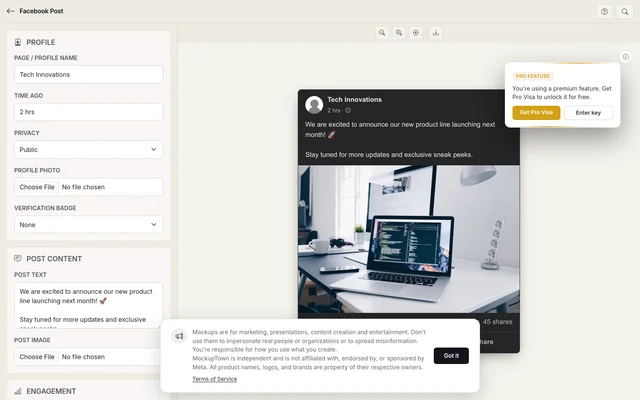 Facebook Post Mockup Generator.
What makes the engagement count
A Facebook post is dense in a way other social formats are not. Where a tweet carries a like count and an Instagram post carries two numbers, a Facebook screenshot shows reaction counts broken out by type, a comment count, a share count, and a timestamp, plus the little face icons in the like row. That density is exactly what makes a realistic screenshot hard to hand-build and easy to spot when it is wrong.
The numbers have to work together and against the account they come from. A post with 1,000 reactions but 2 shares looks like a rounding error, not a real post. A page with 50 followers that somehow pulled in 50,000 reactions is a story nobody will believe.
Profile, then content, then numbers
Start with the source. The username and profile photo set who the post comes from, and the verification badge should only appear if that account would plausibly have one. The badge draws the wrong kind of attention on a small account.
Then the content: a text post or an image post with a caption. Facebook posts lean longer than Instagram captions, and they can carry a question, an announcement, or a short story. The voice matters as much as the subject. Community pages and small businesses do not post in the voice of a corporate press release, so the caption should match how the implied account actually talks. For an image post, use a Facebook-friendly ratio around 1200x630 pixels.
Then the engagement, and this is where Facebook mockups live or die. Keep the numbers in proportion to each other and to the account. A post that went viral has reactions, comments, and shares high together. A modest post has all three modest together.
The build in practice
Set the profile with a username and photo, add the badge if the account warrants it, and write the post in the voice of whoever is posting. Choose the reaction types, like love and laugh, and the comment and share counts, then set a timestamp that matches the story the layout tells. Pick dark or light mode, both matching Facebook's actual colors, preview, and export a high-resolution PNG. The browser does all the work.
The details that keep a second look away
- Match the numbers to the account. Scale the engagement to the implied size of the page or person.
- Keep reaction types in proportion. A mix of likes with a few loves and laughs reads naturally; all laughs and no likes looks unusual.
- Use a real timestamp. "Just now" on a post that looks three days old is a giveaway. Set it to match the story.
- Write like the account. A community manager in first person plural, or a small business owner who answers comments personally, both read as real.
- Check the ratio. A post image wildly off 1200x630 looks cropped or stretched in the mockup.
Where a Facebook screenshot earns its place
- Agency and freelance pitches. A deck that shows what strong community engagement looks like lands better with a realistic screenshot than with a description.
- Marketing campaigns. Social media images for landing pages, where a post about your product reads as more effective than your own claim.
- Content planning. Mock up post styles for a client before anyone posts anything, so the tone is agreed on in advance.
- Product launches. Simulate the kind of reactions and discussion a launch post might get, and build anticipation around the launch date.
- Training and examples. Tutorials about Facebook marketing are easier to follow with a concrete screenshot than with abstract instructions.
A quick word on honest use. Mockups are for illustration: pitches, demos, content examples. Passing one off as a real interaction from a real account is not, and it is usually not worth the trouble anyway, because the number of things that need to line up for a fake to survive scrutiny is huge.
The post you need, in one pass
When your next project needs a Facebook screenshot, you can make the exact post instead of hunting for one that sort of fits.
Open the Facebook Post Mockup Generator, set the profile, write the post, and set reactions that actually make sense for the account. Then export the mockup in the theme your design needs.
Made with MockupTown, the free all-in-one mockup generator.
Frequently asked questions
Do I have to pay for Facebook Post Mockup Generator?
The free tier has carried the full workflow since day one; Pro only adds bigger canvases for print use.
May I use these in client projects?
Use them however you like. The one thing you may not do is present them as genuine platform screenshots.
Do I have to register first?
Creating an account is not something the app even offers. The editor is already live when the page loads.
Can I set multiple reaction types?
Yes. Set like, love and laugh counts separately, along with comment and share counts, so the engagement matches the story.