
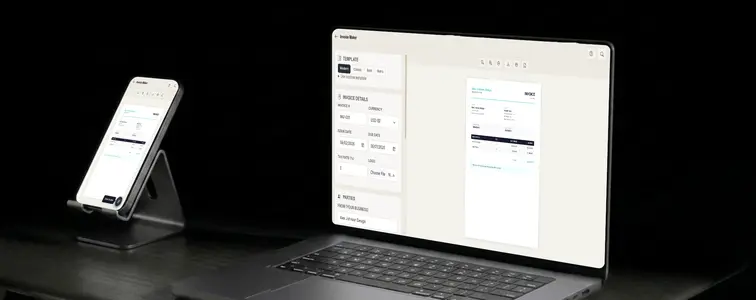
An invoice is two documents at once. To the person who sends it, it is a record: who owes what, for which work, and by when. To the person who receives it, it is a small test of how you run your business, because a sloppy invoice is the first sign of a sloppy project. Most payment delays are not about money. They are about invoices that are confusing, missing a due date, or wrong in a way that the client has to chase you to fix.
The Invoice Generator in MockupTown removes the parts that make invoices painful and leaves the parts that make them effective. You pick a template, add the line items, and the math, layout, and export are handled for you.
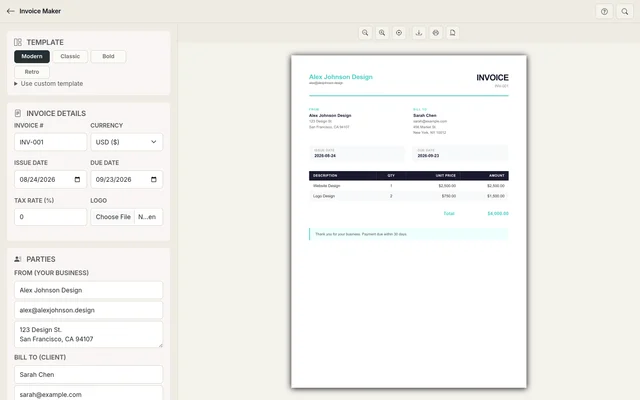 Line items on the left; the live invoice preview with automatic totals on the right.
What actually belongs on an invoice
Before worrying about design, get the skeleton right. A complete invoice has these pieces:
- Your business details. Name, contact, and where the payment goes.
- The client's details. Name and the billing contact.
- An invoice number and date. A simple sequence starting at 001 keeps your records straight and looks organized to clients.
- Line items with quantities and prices. Specific enough that the client can see exactly what they are paying for.
- Payment terms and a due date. Clients pay on the schedule you state, so state one.
That last point does more work than it looks. An invoice with no due date is an invoice with no deadline, and no deadline is how payments quietly slide into "next week, probably."
The math should never be the job
The single most embarrassing invoice mistake is a total that does not match the items. It is also the easiest one to prevent, which is why the generator calculates as you type. Subtotal, tax, and grand total update the moment you add or edit a row, and multiple currencies are supported, so an international client does not break the workflow.
The part that is still yours is judgment: itemize honestly. Every line should reflect work you actually did or goods you actually provided. Padding an invoice is how you lose a client faster than any formatting error could.
Which template says what
The generator shares its template family with the Resume Maker in MockupTown, which is convenient if you want your business documents to feel like one brand:
- Modern for freelancers and agencies.
- Classic for established and traditional work.
- Bold for when the invoice itself is part of your brand presence.
- Retro for businesses where a distinctive look is expected.
The template carries the first impression, but the substance is the clarity of the line items and the terms.
Sending it the way clients expect
Export as PDF for sending. That is the format clients expect, it survives being forwarded and archived, and it will not shift when someone opens it on another machine. PNG is fine for a preview or a record, but the PDF is the version built for invoicing workflows.
One note on legality, because it differs by country: tax rules determine what you must include, like a VAT number or a tax ID, and that depends on where you operate. The generator handles the layout and the arithmetic, but confirming the required fields for your jurisdiction is worth doing before invoicing becomes a habit.
The next time a project wraps up, the invoice can be ready in minutes instead of another spreadsheet rebuild. Open the Invoice Generator, pick a template, add the line items, and send a PDF that looks as professional as the work behind it. Free, no signup.
Made with MockupTown, the free all-in-one mockup generator.
Frequently asked questions
How much does Invoice Maker cost?
It costs nothing. The tool runs entirely on your machine via the browser, which is why it can stay free.
Is commercial use allowed?
That is rather the point of the tool. The one thing you may not do is present them as genuine platform screenshots.
What about accounts or logins?
Nope. Load the page and the workspace stands ready immediately.
Can I print to PDF?
Yes. Click the print button to open the browser print dialog where you can save as PDF.