
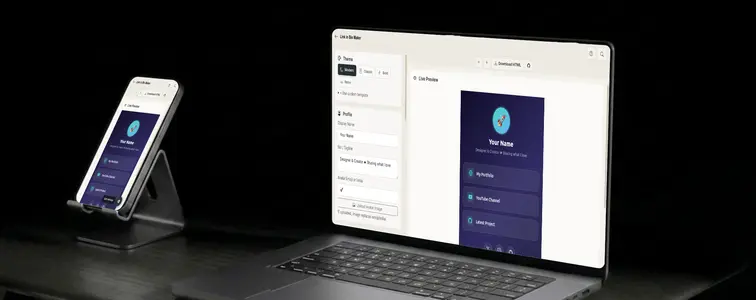
Instagram gives you one link in your bio. TikTok gives you one. Most social platforms do. Which is fine, until you have a website, a portfolio, a YouTube channel, a newsletter, and a store, and you have to pick which one single link deserves the spot.
The usual answer is a link-in-bio service. It works, but it tends to come with a monthly fee for anything beyond the basics, a "Powered by" badge, and analytics that quietly track everyone who clicks. If you would rather own the page outright, the Link in Bio Maker in MockupTown is a simpler path. It builds a clean, self-contained links page, and it costs nothing to make or host.
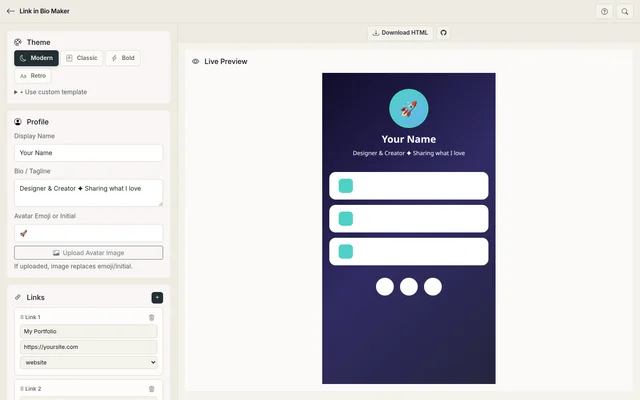 Link in Bio Maker.
What you are actually building
A links page is a single web page with your name, a short bio, and a stack of buttons pointing at everything you want people to find. It replaces the one link in your bio with a menu of links. The Link in Bio Maker generates the whole page for you, lets you pick a theme, and hands you the finished HTML file. No backend, no account, no database. It is a static page that belongs to you.
Putting the page together
1. Set up your profile
Open the Link in Bio Maker and start with the profile section. You get three fields:
- Display name. Your name or brand.
- Bio or tagline. One or two lines describing what you share.
- Avatar. An emoji or single initial by default, or you can upload an actual image and it replaces the emoji.
Everything here is optional. A bare page with just links works fine, though the avatar and bio are what make it feel like a person rather than a link dump.
2. Add your links
This is the main event. Click the plus button to add a button, give it a label and a URL, and it appears in the live preview on the right. Add as many as you want and drag them into the order that makes sense. Your most important link should usually be at the top, because that is what people see first on a phone.
There is a separate list for social icons, for the platforms that deserve an icon instead of a full button. So your core links get big, tappable buttons, and your secondary profiles sit neatly in an icon row at the bottom.
3. Pick a theme
Four ready-made themes cover most tastes:
- Modern. Clean and dark, the default look.
- Classic. A traditional light layout.
- Bold. High-contrast and attention grabbing.
- Retro. A nostalgic, type-heavy style.
If none of them fit, there is a "use custom template" option. You paste your own HTML template with placeholders like {{name}}, {{bio}}, {{#each links}} and {{#each socials}}, and the tool fills in your content. It is a small templating system hiding inside a links page builder, and it means your page can look like absolutely anything you can write in HTML.
4. Download or deploy
Two ways to publish. You can click Download HTML and get a single, self-contained file with your profile, links, and theme baked in. Upload that file to any static host, attach it to a domain you own, or keep it local. Your call.
Or use the GitHub Pages deploy button inside the tool. Sign in to GitHub, and the tool pushes the page to a free, permanent URL under your account. That gives you a live link you can put in your bio within a few minutes, with no hosting bills.
Who ends up needing this
- Creators with a link in bio. Replace the single Instagram or TikTok link with a page of everything: latest video, article, product, and profiles.
- Consultants and small businesses. A lightweight landing page that points clients at your services, calendar, portfolio, and contact details. Free hosting makes it a genuine option for a business without a website.
- Podcasts and newsletters. One page for subscribe, listen on Spotify, follow on Twitter, and share. Everything a listener needs in one place.
- Online stores. Shoppers land on a page of your store, best sellers, and reviews, all from one link in a profile or ad.
Why self-hosted beats a link service
This is where a self-hosted page beats a link-in-bio service. The generated HTML has no third-party analytics built in. No tracking pixels, no visitor profiles, no data sold to ad networks. The tool itself runs entirely in your browser, so your name and links are not uploaded anywhere during the build. If you want analytics, you can add your own script to the custom template and own that data yourself. Most people will appreciate that nobody is quietly counting their clicks by default.
The limits worth knowing
There is no built-in click counter. Because the page is static, you do not get a dashboard of how many people visited or clicked, unless you add analytics yourself in the custom template. And if you want a live URL through the tool, the GitHub Pages route needs a GitHub account. If you already have one, this is the fastest free path to a permanent link. If not, the downloaded HTML file works with any static host you happen to use.
One more thing worth knowing: the page is a plain HTML file, so there is nothing to hack into, nothing to break, and nothing to migrate. If you decide next year that you want a different design, you rebuild it in a minute and redeploy.
Build yours once
If you have ever been annoyed by the single-link limit on social media, this fixes it in about the time it takes to make a coffee.
Open the Link in Bio Maker, add your profile and links, pick a theme, and download the page or deploy it to GitHub Pages. Free, private, and yours.
Made with MockupTown, the free all-in-one mockup generator.
Frequently asked questions
Do I need an account?
No. Everything works in your browser with no signup. If you want a free live URL you can deploy to GitHub Pages from within the tool.
What do I get when I download?
A single, self-contained HTML file with your profile, links, and chosen theme baked in. Upload it to any static host.
Are my links tracked or shared?
No. Your data stays in your browser. The generated page is a plain HTML file with no third-party analytics.
How many links can I add?
As many as you want. Add unlimited buttons and social icons, then reorder them freely on the page.