
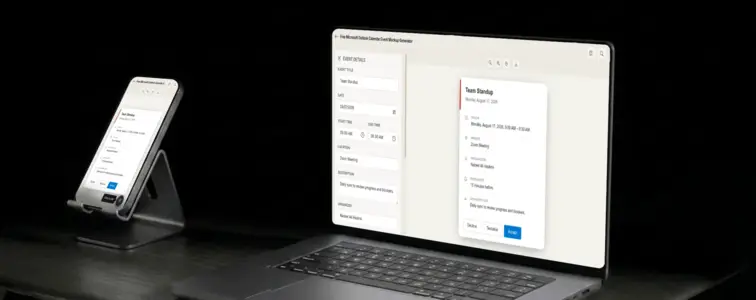
Outlook Calendar is the enterprise c
Outlook Calendar is the enterprise calendar. It is the one that comes with Microsoft 365, the one that corporate IT departments configure, and the one that most business professionals open every morning. When someone in a corporate environment pictures a calendar event, they are almost always picturing Outlook. The Segoe UI font, the bold header, the blue accent, the specific way event cards are structured inside the Outlook interface. It is a design language that communicates professionalism, structure, and business.
That is what makes an Outlook Calendar mockup valuable for enterprise presentations and corporate documentation. The problem is that reproducing the Outlook styling by hand is tedious, because the details are precise and specific to the Microsoft design system. The Outlook Calendar Event Mockup Generator in MockupTown renders the actual layout, so your mockup looks like it came from the real app.
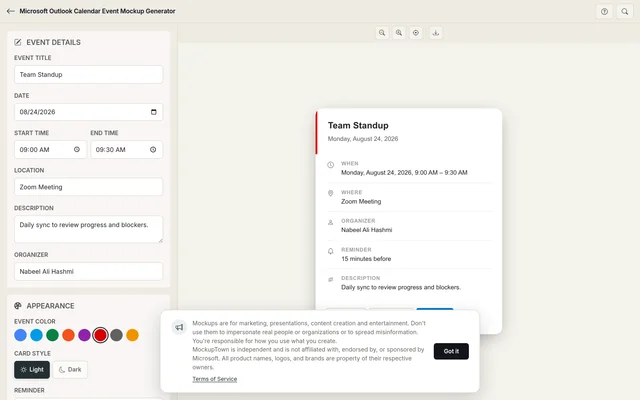 Outlook Calendar Event Mockup Generator.
Why Outlook carries enterprise weight
Outlook is not just a calendar. It is a signal. When you show an event card in Outlook styling, you are telling the viewer that this is a corporate context, a business meeting, a professional workflow. The design carries that weight because it is the calendar that runs inside most large organisations.
The typography is part of that signal. Segoe UI is Microsoft's system font, and it is designed for readability in business contexts. The letterforms are clean, the weights are specific, and the spacing is optimised for screens that professionals stare at all day. A mockup that uses this font stack immediately reads as "work" rather than "personal."
The corporate design language
Outlook's event card design follows the Microsoft Fluent design system. The header is bolder than Google or Apple, with a coloured bar that is more prominent. The text hierarchy is clear and structured, with the title in a larger, heavier weight. The time formatting uses the 12-hour format by default, with a clear separator between start and end times. The location and organizer fields are visually distinct, separated by icons and spacing.
This design language communicates structure and organisation. An event card in Outlook styling does not look casual or personal. It looks like something that was set up by an assistant, approved by a manager, and synced across a corporate calendar system. That is the exact feeling you want when presenting enterprise features, corporate workflows, or business scheduling concepts.
The details that make it look like a real Outlook event
- Use the Segoe UI font stack. The generator handles this automatically, but understanding the font choice helps you spot a good mockup from a bad one.
- Format the time correctly. Outlook uses a specific time format with clear AM/PM indicators. The generator handles this.
- Pick a corporate colour. Outlook uses bolder, more saturated event colours than Google or Apple. The generator provides the actual Outlook palette.
- Add the organizer field. Outlook prominently shows who organised the event, which is important in corporate contexts.
- Use a specific location. "Conference Room B" or "Microsoft Teams" reads as true to the real thing for corporate events.
Where an Outlook Calendar mockup fits
- Enterprise product demos. If your product integrates with Outlook Calendar, showing the actual event card demonstrates the integration in a way that resonates with corporate users.
- Corporate presentations. Investor decks, board presentations, and internal strategy meetings often use Outlook. An Outlook Calendar mockup fits naturally in these contexts.
- IT documentation. System administrators and IT teams use Outlook Calendar mockups in training materials, setup guides, and workflow documentation.
- Business blog posts. Articles about enterprise productivity, Microsoft 365 features, or corporate scheduling benefit from realistic Outlook visuals.
- Educational content. Corporate trainers and business educators use Outlook Calendar mockups to show scheduling concepts in the calendar their students actually use at work.
Building an Outlook event in two minutes
Open the Outlook Calendar Event Mockup Generator, enter the event title, date, start and end times, location, and description. Pick a colour from the Outlook palette. Choose light or dark mode. Export as a high-resolution PNG. The whole thing happens in your browser.
The generator uses the actual Outlook Calendar layout, with the Segoe UI font stack, the correct header styling, and the accurate colour palette. The result looks like a screenshot from a real Outlook installation, not a hand-built approximation.
A candid note - these calendar visuals exist to demonstrate your own product, They are intended for design, training, and illustration purposes only, not for misleading audiences. Show what an event could look like, not what someone else's calendar contains.
When your project needs an Outlook Calendar event visual, you can build the exact card instead of describing one in text. Open the Outlook Calendar Event Mockup Generator, set the details, pick a colour, and export a mockup that looks like it belongs in the real app.
Made with MockupTown, the free all-in-one mockup generator.
Frequently asked questions
Does this require a Microsoft 365 or Exchange account?
No. The tool runs entirely in your browser. It does not authenticate against any Microsoft service.
Does it match Outlook on the web or the desktop app?
The layout reflects Outlook's web interface with the characteristic blue header and Segoe UI fonts.
Can I show Microsoft Teams meeting details?
You can type Teams meeting links or details in the location or description fields. The mockup does not render the Teams toggle, but the event content is fully customizable.
Can I show room bookings and resource scheduling?
Yes. Type a room or resource name in the location field or description. The mockup displays it in the same position Outlook uses for room and resource information.