
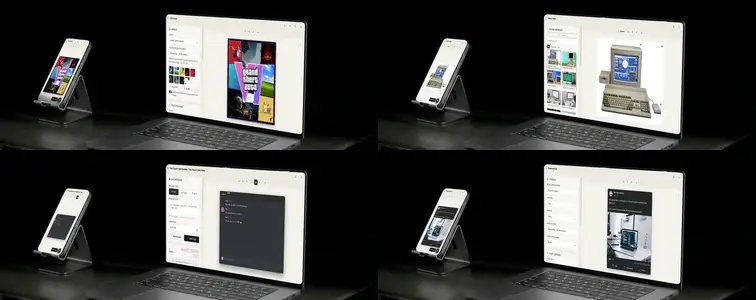
A roundup of everything that shipped this month: the GTA 6 Cover Generator grew into the whole Grand Theft Auto series, Scene Frame got a major rework with new typefaces, the Facebook post mockups can go text-only, the Animated Chat Generator's Discord skin and custom backgrounds were fixed, and a long-running drag-and-drop bug in Combine Images is fixed.
Nine Grand Theft Auto covers, one tool
The GTA 6 Cover Generator started as a single look: the GTA VI nine-panel collage. It is now the whole series. Pick a game from the Game menu and the cover rebuilds itself:
- GTA VI - the nine-panel collage with the gradient VI logo
- GTA V - the wide banner layout with the V ribbon emblem
- GTA IV - the cold grey-blue box art with its slab numeral
- Episodes from Liberty City - the muted Liberty City look
- Vice City Stories - the pink script and swoosh
- Liberty City Stories - the red banner and stretched wordmark
- San Andreas - the blackletter title over a warm orange grade
- Vice City - pink and teal with a handwritten logo word
- GTA III - the simpler, flatter original collage
Each game loads its own panel layout, frame color, color grade, slant, title placement and logo style. The older box arts use layouts measured from the real covers rather than approximated, so the slanted and straight edges land where they do on the original. Beyond the games there are fourteen layouts to choose from, and some of the classics have up to twelve panels.
Nothing is locked once you switch. Every setting the game choice applies stays editable and your images carry over, so you can run the same photo set across several eras without starting over.
Panel Look
A pile of photos rarely shares a palette, and ungraded panels sitting next to each other read as separate images instead of one cover. Panel Look fixes that across the whole cover at once: a two-color wash baked into every panel with the strength and the top and bottom colors under your control, then saturation, contrast, corner vignette and a light edge on the panel borders.
The grade goes into real pixels rather than sitting over the top as a filter, so what you see is what lands in the export. Switching games reloads that cover's grade, and Reset Look puts the whole set back to that game's defaults in one click.
Your lettering, or your logo
The older covers bring their own lettering rather than the VI treatment: a handwritten Vice City logo word, blackletter San Andreas, the slab numeral for GTA IV, each keeping its own text and outline colors. If you want to match a specific cover exactly, upload a PNG or SVG through Custom Logo Image and it replaces the drawn logo entirely. Remove Custom Logo brings the built-in one back whenever you want it.
Exports cover all the uses: the official cover ratio, the classic 4:5 box art ratio, or a square for feeds - all PNG at double the on-screen size.
Scene Frame Generator: multiple screens in one scene
The biggest Scene Frame change: a scene photo is no longer limited to one screen. Add a screen for every display in the photo - a laptop, a phone on the desk, a wall display - each with its own image, fit mode, quad and settings, and switch between them from a thumbnail list in the sidebar. New screens open in click-to-detect, so one click on the scene cuts out the display, and Apply to all copies the selected screen's image onto every screen at once.
Also new: a ratio advisor shows the screen ratio and your image ratio side by side against common formats, and warns before Fill mode would stretch your image - switch to Cover with one click. While editing, the active handle shrinks to a precise dot and the others step aside, on phones the handles stay finger-sized, and whole screens can now be dragged around the scene without any corner leaving the photo.
Facebook posts without the image
The Facebook Post mockup now has a Remove Image button next to the post image field. Drop the image and the post renders as clean text-only, which is the most common real post shape on the feed. The button only appears while an image is loaded.
Animated Chat Generator: Discord and Slack fixed
The Discord skin was the one that looked wrong. The avatar circle beside every message came out invisible, because the rule asked for a fallback color and a photo in the same shorthand - and when the photo was missing, the whole declaration collapsed instead of falling back to the color, so you got nothing at all instead of the Discord blurple.
The header had it backwards too: it showed the contact name and a bare channel hash side by side, even though the contact name is already printed on every single message. The header now shows the channel on its own, the way Discord does.
And an uploaded contact photo never made it into the conversation, because those desktop skins draw their own avatars from it and the upload only fed the phone header. Now your photo shows up on every message that needs it.
The Slack skin had the same invisible avatar, so it got the same treatment.
Backgrounds that take real CSS
The stage background box was locked to a single property. You could type a background value and that was the end of it - anything longer was quietly thrown away by the browser before it ever reached the screen.
It takes real CSS now. A plain value like #111 or linear-gradient(...) behaves exactly as before. Type actual declarations - background-color: #111; background-image: radial-gradient(circle, #333, #000); - and they are applied to the stage as written, so you are not limited to background any more. Both the live preview and the recording stage pick it up, and switching back to a preset clears it out cleanly.
Combine Images drag fix
An earlier fix meant for iOS was accidentally blocking native drag-and-drop on desktop Chrome in Combine Images. The touch-only rules are now properly scoped to touch devices, and dragging panels behaves the same on desktop and mobile again.
Try it
Everything here is free in the browser at MockupTown, with no signup and no uploads - your images never leave your device.