
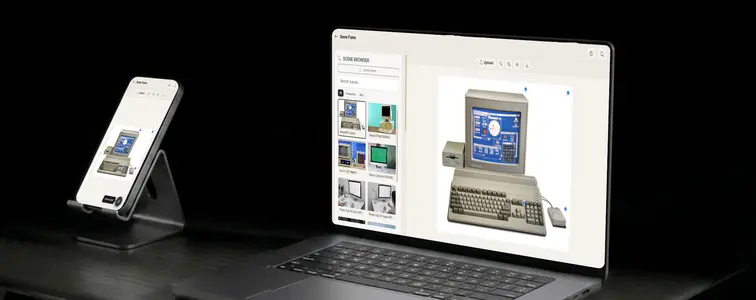
There is a specific moment in every design project where a flat screenshot stops being enough. The client needs to see the app on a phone, or the campaign art needs to appear on a billboard, or the landing page needs to be shown in a laptop frame, and a raw screenshot in the deck is not going to sell it.
Device mockup scenes exist for exactly that reason. They put your content in context, and context is what makes a design feel finished. The problem with the traditional approach is that it means buying a mockup template, opening a design app, and fighting with masks and perspective. The Scene Frame Mockup Editor in MockupTown does the placement for you, and it does it in a way that works for flat screenshots and for scenes with perspective.
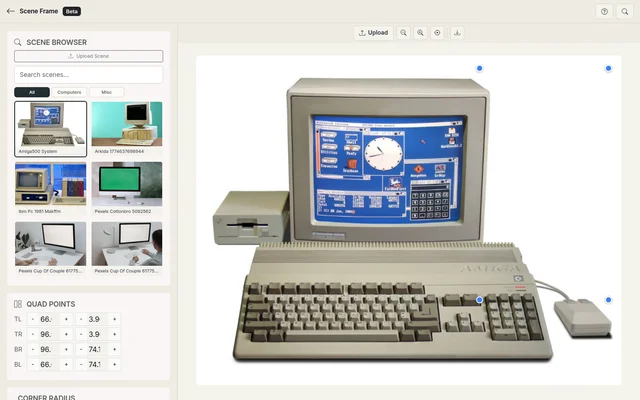 Scene Frame Generator.
The moment a flat screenshot stops being enough
Flat screenshots work in internal docs, but they do not sell a design to someone who has never used the product. A phone frame, a laptop screen, a billboard mockup, or an outdoor scene gives the content context, and context is what makes a design feel finished. The Scene Frame Mockup Editor handles the placement and perspective so you do not have to open a separate design app to get there.
The screen detection does the locating
The editor analyzes the scene and finds the screen area automatically, using four detection algorithms: transparent cutout detection, edge gradient profiling, center-out scanning, and a brightness transition fallback. Together they cover the messy real-world cases, like a phone photo where the edge is visible. The algorithms are good, but a busy scene can fool any automatic detection, which is why the corner handles exist.
The quad handles are what make perspective work
A screen photographed at an angle does not sit in a rectangle; it sits in a quadrilateral. Drag the four corner handles, or type in exact coordinates, to set the content area, and your content follows the perspective naturally. Match the corner radius to the device's screen edges. Screens are rounded, and square corners on a phone screen is the detail that makes a mockup feel fake.
Building a scene
Browse the library and pick a frame, or upload your own scene image and turn it into a frame. The library is organized by category, from phones and tablets to laptops, billboards, and outdoor scenes. Upload your PNG or JPEG, and the smart detection runs immediately and finds the screen area. Fine-tune with the quad handles or exact coordinates, set the corner radius, then adjust position, zoom, and opacity until the content sits flush. Export as a high-resolution PNG. Your data never leaves the browser.
Getting the best result
- Use high-resolution content. The mockup is only as sharp as the image you drop into it, so start with the largest version of your design.
- Trust but verify the detection. The corner handles exist for exactly the case where a busy scene fools the automatic detection.
- Match the radius to the device. Square corners on a rounded screen is the fastest way to feel fake.
- Watch the perspective. Line the quads up with the visible corners and the content follows the scene naturally.
- Keep opacity honest. A fully opaque overlay on a transparent or clearly mapped area reads as real; a half-transparent overlay looks like a design decision gone wrong.
Where scene frames earn their keep
- Device mockups. The core use: putting phone, tablet, and laptop screenshots into realistic device scenes for presentations and portfolios.
- Product photography. Overlaying product images onto billboards and outdoor scenes shows scale and placement, which is useful for ad concepts and pitches.
- UI and UX mockups. Showing app designs and website screenshots in device frames is standard practice, and doing it well separates polished work from amateur work.
- Presentations. Pitch decks and client reports look dramatically better with designs in context instead of as loose images.
- Marketing assets. Social media visuals and ad creatives with scene overlays stand out in a feed full of flat graphics.
A note on responsible use: for scene frames is milder than for the chat and social mockups: these are clearly presentation visuals, and putting your own design into a device frame is a normal, legitimate practice. The line is only crossed when you imply the design is running on a device or in a location where it is not, such as a real photo of a screen showing a product you have not shipped.
When you need the exact scene
When a design needs context, you no longer have to hunt for a template or open a heavy design tool.
Open the Scene Frame Mockup Editor, pick a scene, upload your content, and let the smart detection place it for you. Fine-tune with the quad handles and export a polished mockup as a PNG.
Made with MockupTown, the free all-in-one mockup generator.
Frequently asked questions
Does Scene Frame Generator cost anything?
Yes. No credit card, no trial countdown. Dismissing the upgrade notice removes zero capability.
Can I upload my own scene images?
Yes. Use the Upload Scene button to load any image as your scene frame.
How does the screen detection work?
Scene Frame uses four algorithms: transparent cutout detection, edge gradient profiling, adaptive center-out scanning, and brightness transition fallback. Results are automatic but can be fine-tuned with quad handles.
What image formats are supported for content?
PNG and JPEG images are supported for both scenes and content overlays.