
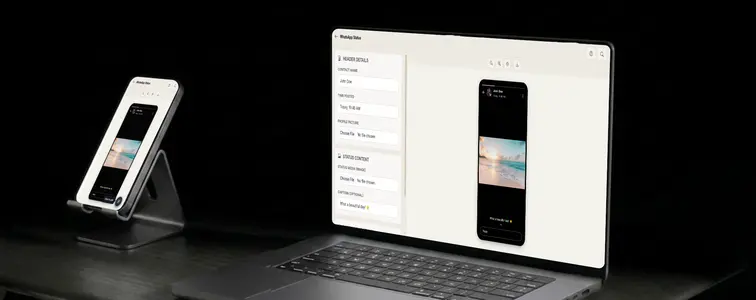
WhatsApp status is the feature millions use daily and never think about, which is exactly why it works so well in a mockup. To show how a brand's content looks when shared, a status screenshot carries the message instantly: everyone recognizes the format even though nobody thinks about it.
The catch is that the format looks deceptively simple and is deceptively hard to fake. The header with the contact name and photo, the gradient over the image, the caption blended into it, the reply bar versus the eye icon, the phone frame around the whole thing. Skip any of these and the result is a cheap crop, not a WhatsApp screen. The WhatsApp Status Mockup Generator in MockupTown renders all of it, phone frame included.
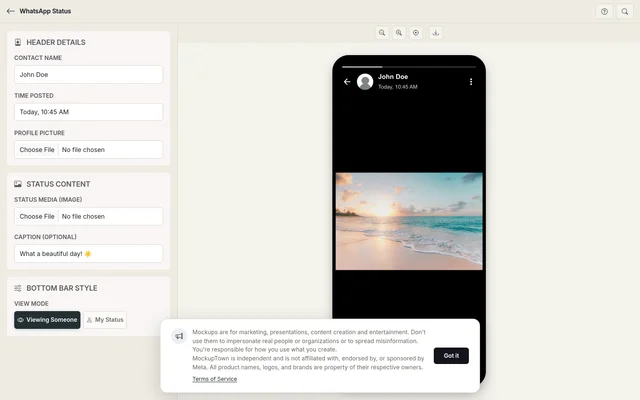 WhatsApp Status Mockup Generator.
The one decision that changes the meaning
The status format has a split personality, and choosing the right side of it is the single most important decision in the mockup. There are two view modes:
- Viewing someone else's status shows the reply bar. It reads as "here is what someone is looking at right now": a person mid-browse, reacting to content.
- My Status shows the eye icon with a view count. It reads as "here is a status that got seen": a piece of content with an audience attached.
A reply bar under a product-launch image looks odd; the eye icon with a view count fits that story better. The view count is yours to set, and it is the one number people will actually read, so scale it to the story: a status from a small contact with 40,000 views raises questions.
The details that carry the frame
Everything around the media does the work of making it read as WhatsApp:
- Contact name and header. The name tells the viewer whose status they are seeing, which decides what the mockup means. Match it to the image underneath.
- The gradient. Real captions sit on a subtle image gradient. The generator blends the caption the same way, so it reads as part of the screen, not text pasted on top.
- The phone frame. The mockup renders inside a realistic iPhone shell with rounded corners and bezels, a complete device shot, not a floating image.
Putting the status together
Getting started is quick: set the contact name, the time posted, and the profile photo; upload the status image and an optional caption; choose the view mode that tells the story you want; then export a high-resolution PNG, phone frame and all. All processing happens on your device.
Writing a status that passes the glance test
- Keep the caption short. Real status captions are a few words, not paragraphs, and short text stays readable over the image.
- Match contact to content. The name at the top and the image in the status should tell the same story, or the mockup confuses.
- Choose the view mode deliberately. Reply bar or eye icon: pick the one that matches what the mockup is claiming.
- Keep the caption legible. WhatsApp dims the image behind the header, but the caption still needs contrast to survive.
- Scale the view count. The number should fit the implied size of the contact.
Where status mockups get used
- Marketing campaigns. Show how people might share or see your brand's content on WhatsApp.
- Memes and entertainment. Status screenshots are a staple of viral content, and a well-made mockup is the punchline.
- Presentations. Realistic WhatsApp mockups add polish to decks and client reports where the audience is already on the app.
- Content creation. YouTube thumbnails and blog posts about WhatsApp marketing are clearer with a concrete status to point at.
- A/B testing. Mock up different images and captions side by side to see which one lands.
Use this responsibly: is the familiar one: status mockups are for illustration, demonstration, and clearly-marked social content. Presenting one as a real status from a real person, a real name attached to content they never posted, is the line you do not cross.
Any time a WhatsApp status screenshot earns its place in your work, you can build the exact one instead of cropping a real person's status. Open the WhatsApp Status Mockup Generator, set the contact, upload the image, choose your view mode, and export a phone-ready mockup as a PNG.
Made with MockupTown, the free all-in-one mockup generator.
Frequently asked questions
Is WhatsApp Status Mockup Generator free to use?
Yes, and not "free with catches": no watermark, no quota, no upsell wall between you and the download button.
Can I use the results commercially?
Yes - exports are yours to use anywhere. Ads, prints, merchandise - every channel is fine.
Do I need an account?
Never. Look for a register button and you will keep looking - none exists.
Can I switch between viewer and owner modes?
Yes. Use viewer mode to show the reply bar of someone else's status, or owner mode for your own.