
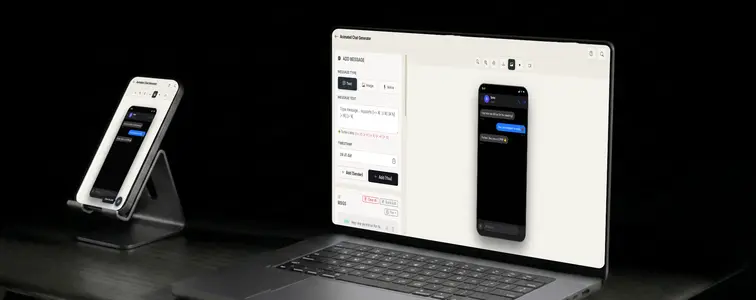
A static chat screenshot tells a story, but a chat that animates tells a story and sells it. Watching messages appear one by one, with the typing indicator bubbling up between replies, has a momentum that a still image cannot match. That is why animated chat mockups dominate short-form social content and product demos.
The problem has always been that producing them is slow. You write the conversation, render each state, sequence the frames, time the pauses, and hope the typing indicator lines up. The Animated Chat Generator with AI in MockupTown collapses that workflow into a builder: you type the conversation, the tool handles the platform styling, the typing animation, and the playback.
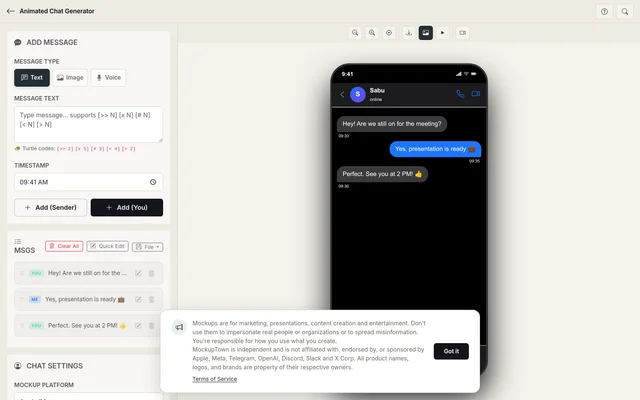 Animated Chat Generator.
Turning text into a video
An animated chat is not a screenshot that moves. It is a tiny script with timing, and the two halves have to work together:
- What is said. The exchange itself, written short the way people actually text.
- When it is said. The pauses, the typing indicators, the interleaved replies that give the conversation its rhythm.
A script without timing is a flat list of messages, and a timeline without a script is empty motion. The builder handles the rendering, which leaves you to handle the one thing that matters: a conversation that feels like two people actually messaging.
How the scripted playback works
The tool's scripting feature is what separates this from a simple animation. Small control codes embedded in the messages direct the playback: corrections, pauses, and interleaved replies. Instead of every message arriving on a uniform beat, the conversation breathes where a real one would breathe. The Turtle of Ark scripting guide walks through the codes in detail.
- Pauses. A beat of silence before an important reply, with the typing indicator holding, is where the tension lives.
- Corrections. Simulating a message that gets edited or corrected mid-conversation, the way people actually text.
- Interleaved replies. Real chats alternate senders naturally, and the timing codes let you mirror that.
Matching the platform to the story
The same script reads differently depending on where it happens. A customer support exchange reads best on WhatsApp, where support conversations actually happen. A product demo reads naturally on iMessage. Marketing content often lands best on Instagram. Pick the platform the audience already associates with the scenario, and the mockup arrives with context pre-attached.
Writing for motion
- Write like a texter. Short messages, occasional punctuation quirks, realistic response lengths. Nobody texts in paragraphs.
- Use the typing indicator deliberately. Script the pause before an important reply like a beat, not an afterthought.
- Interleave the replies. Long runs of messages from one side read as a monologue.
- Keep it short. Animated content is short by design. If the conversation takes thirty seconds to reach the point, trim it.
Where animated chats earn their place
- Marketing campaigns. Animated conversations stop the scroll on social feeds, which is why the format is everywhere in short-form content.
- Presentations. A demo that shows a conversation happening is more effective than a slide describing what a conversation would look like.
- Content creation. YouTube thumbnails and videos about messaging, support, or sales use animated chats as visual shorthand.
- Product demos. Chat-based products come alive when their own interface animates, and a mockup lets you show that before or without building it.
- A/B testing. Compare two conversation scripts, phrasings, or pacing side by side to see which reads better.
Putting the animation together
Here is how it works: pick the platform that matches the context, set the contact name and profile photo, build the conversation with the sender toggle, script the timing with the control codes, and preview the playback at your chosen speed. Then export the result as a high-resolution PNG. For video, the animation is designed to be recorded or screen-captured from the playback. The whole thing happens in your browser.
One thing to keep in mind - it applies to animated chats more strongly than to static ones, because video is more compelling. These are for demonstrations, ads, and clearly-marked content. Using an animated mockup to claim a real conversation happened, especially with a real person's name, is deceptive and easy to expose.
Whenever a chat that moves would help tell the story, you can build the conversation and script the timing instead of hand-animating frames. Open the Animated Chat Generator with AI, choose a platform, build the messages, script the pauses, and export an animated mockup that looks like a realistic conversation unfolding.
Made with MockupTown, the free all-in-one mockup generator.
Frequently asked questions
Does Animated Chat Generator cost anything?
Nothing up front and nothing monthly. Optional Pro upgrades only add larger export sizes.
Are exports cleared for commercial work?
Without restriction. Ads, print goods, digital products - attribution never required.
Is signing up required?
Sign-up is not part of the flow. Good luck finding a registration link - none exists to be found.
What platforms are supported?
Nine chat formats ship built-in: iMessage, WhatsApp, Instagram DM, Messenger, Telegram, ChatGPT, Discord, Slack and Twitter DM.