
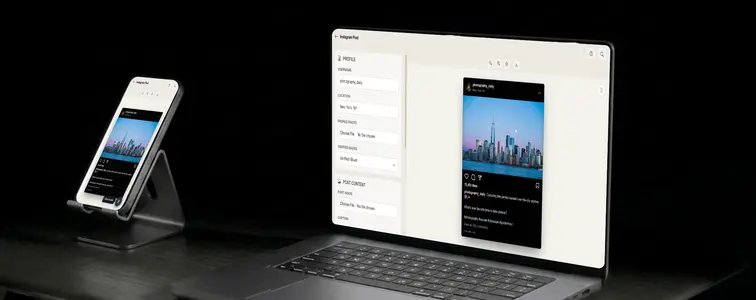
Instagram screenshots appear everywhere they are not supposed to: pitch decks, landing pages, YouTube thumbnails, portfolio case studies. The reason is simple: a screenshot of a post that performed well carries more weight than a line of text claiming the same thing, because it shows the result in context.
The problem with real screenshots is that real content never says exactly what you need it to say. That is what the Instagram Post Mockup Generator in MockupTown solves. You write the post, set the numbers, and it renders as a realistic Instagram screenshot, ready for whatever project needs it.
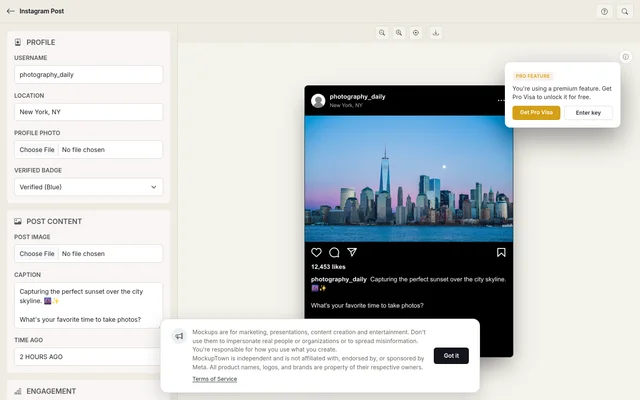 Caption, engagement, and theme controls on the left; the rendered Instagram post on the right.
A mockup is a claim, so make it consistent
An Instagram post is a set of claims stacked on top of each other: the username, the content, the engagement, the verification. They only work if they tell one story. That is the first rule of a good mockup, and it governs everything below.
- The username and the content should match. A verified badge on a throwaway-looking account stands out for the wrong reason. Small accounts do not have badges, so if the mockup is supposed to come from a normal creator, skip it.
- The image should match the location. A photo of the Paris skyline with a location in Tokyo is a giveaway.
- The engagement should match the implied account. A two-minute-old post from a small account with 400,000 likes gets laughed at, not believed.
What the tool puts under your control
The generator covers the pieces that make a post read as real:
- Profile. Username, optional location, profile photo, and the blue verified badge.
- Post content. The main image at Instagram's own ratios (1:1 or 4:5), plus the caption, where most of the work happens. Hashtags and mentions render like the real app, as clickable-looking links, and multi-line captions work. A time-ago field lets the post read as "2 HOURS AGO" or however old the story needs it.
- Engagement. Like and comment counts with automatic comma formatting. Type 12453 and it displays as 12,453, the way the app actually formats it.
- Theme. Dark mode by default, with a light mode toggle that matches Instagram's real color treatment.
Writing a caption like a person
The caption is where mockups usually fail, because people write it like a press release. Real Instagram captions are informal, broken across a couple of lines, often ending in a question, with a handful of hashtags trailing after. A perfectly punctuated paragraph with a semicolon is not how Instagram captions sound. Write the caption the way the account you are implying would write it, and the whole screenshot comes together.
The numbers carry the story
Engagement is where restraint pays off. The automatic comma formatting handles the display, but the values are yours, and they decide whether the mockup holds up. Scale likes and comments to the size of the account you are implying. Restraint is not timidity here. A plausible number on a quiet post reads better than a viral count on a nobody.
The short build
The workflow is quick: set the profile (username, photo, optional location and badge), add the image and caption, set the engagement numbers, then switch dark and light to see which fits your context and download a high-resolution PNG. Built entirely in the browser.
Where people actually use this
- Marketing campaigns. A post showing people reacting to your brand is a familiar format, and a mockup lets you show it before you have real reactions.
- Presentations. A realistic Instagram screenshot adds weight to a pitch deck and beats a text slide describing what a good post looks like.
- Content creation. YouTube thumbnails and blog headers use Instagram mockups as shorthand for social media and engagement.
- Product launches. Simulate the kind of post your audience might make about your product, and tease reactions before launch day.
- A/B testing. Mock up two captions or two visual approaches side by side to compare before committing to anything real.
And the standard honesty note: mockups are for demonstrating and illustrating. Using one to pass off as a real post from a real account has a way of surfacing at the worst time. Keep yours on the creative side.
Next time a project needs an Instagram screenshot, you can build the exact post instead of cropping a real one. Open the Instagram Post Mockup Generator, set the profile, write the caption, and export a post that looks like the real thing.
Made with MockupTown, the free all-in-one mockup generator.
Frequently asked questions
Does Instagram Post Mockup Generator cost anything?
Yes. No credit card, no trial countdown. The upsell nags are dismissible and hide no feature.
Are exports cleared for commercial work?
Go ahead and ship them. Free exports carry exactly the same usage rights as Pro ones.
Is signing up required?
No. Account creation, email fields and passwords simply have no place in this product.
What image sizes work best?
For best results, use standard Instagram aspect ratios like 1:1 (square) or 4:5 (portrait).