
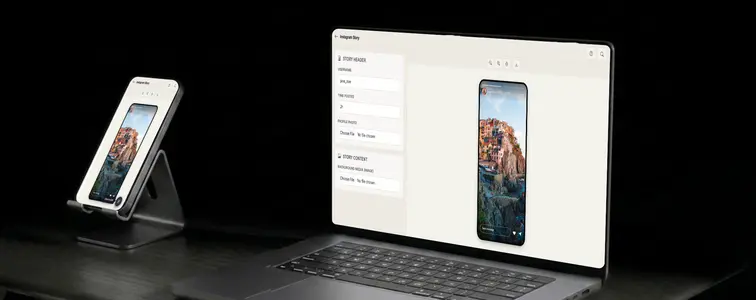
Instagram stories have their own visual language, and it has nothing to do with the post feed. The tall 9:16 frame. The gradient ring around the profile photo. The progress bar along the top. The reply bar at the bottom. A mockup that confuses the two formats gets caught in a second, because anyone who has used Instagram for a week knows the difference by feel.
That is why the Instagram Story Mockup Generator in MockupTown exists separately from the post generator. Stories are a different format with different details, and the mockup has to get those details right: the profile header, the full-screen media, the progress fill, and the reply row that makes a story look like it is actually being viewed.
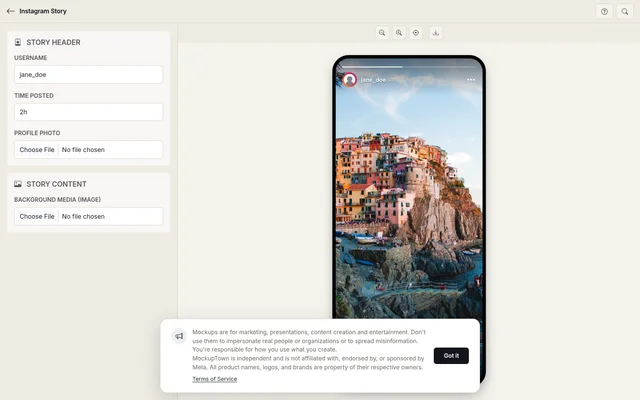 Instagram Story Mockup Generator.
Why format matters on Stories
A story is ephemeral by design, and the mockup has to say that without words. The details that carry it:
- The gradient ring. The multicolor circle around the profile photo is the single most recognizable story detail in the whole app. It is the little badge that tells everyone "this person has posted a story."
- The progress bar. The fill at the top shows how far through the story you are. It should read like a story mid-view, not a completed one, unless the completed state is the point.
- The reply bar. The bottom row with the reply input, the heart, and the send icon is what makes the mockup a live story rather than a poster. Without it, you have a screenshot of a photo.
- The 9:16 frame. The tall ratio is what the whole format is built around. A landscape image in a story frame will not work, because real stories do not look like that.
From idea to live story
Walk through the process: set the username and profile photo (the gradient ring appears around it automatically), upload tall media at roughly 9:16, and check that the story chrome reads well under the image. The progress bar and reply bar are part of the screen, so this last step is mostly about media that keeps the header readable and a username that fits. Then export a high-resolution PNG. Everything stays on your device.
What makes a story look live
- Use 9:16 media. The tall ratio is non-negotiable; the frame is built around it.
- Keep the username consistent. The header and the implied account should match the story's content, the same way they would in the feed.
- Let the progress bar tell time. Mid-view fills read as active; a fully filled bar reads as "already seen." Use whichever fits the story.
- Keep the chrome visible. The reply row is part of the format. Its presence is what separates a story from a photo screenshot.
- Watch the contrast. Story text and header sit on whatever image you upload, so choose media that keeps them readable.
Where story mockups show up
- Marketing campaigns. Story-style visuals are a native format for promotions, and a mockup lets you design the exact story frame a campaign needs.
- Presentations. Pitch decks about social media strategy are clearer with a concrete story mockup than with a text description of one.
- Content creation. YouTube thumbnails and blog headers use story mockups as shorthand for the vertical, ephemeral format.
- Social media. Posting story-style content that is clearly a mockup is itself a content format, especially for teasers and announcements.
- A/B testing. Compare two story images, captions, or visual treatments side by side before committing to a real post.
The same honesty note as the post generator: these are for illustration and demonstration. Passing a mockup story off as a real story from a real account, with real views, is the line to avoid, and it is easy to spot when the account does not match the content.
The next time a an Instagram story screenshot settles an argument or sells an idea, you can build the exact frame instead of repurposing a screenshot from the feed. Open the Instagram Story Mockup Generator, set the username, upload tall media, and export a story mockup as a PNG with the full story chrome intact.
Made with MockupTown, the free all-in-one mockup generator.
Frequently asked questions
Do I have to pay for Instagram Story Mockup Generator?
Cost-free by design. Paying exists for higher-resolution exports alone - nothing else about the tool changes.
May I use these in client projects?
Without restriction. Billboards to business cards: usage is unrestricted.
Do I have to register first?
Not at all - anonymous by default. No signup wall, nothing stored server-side - the tool is stateless by design.
What image sizes work best?
For best results, use tall images with a 9:16 aspect ratio for the story media. The tool also handles other sizes automatically.