
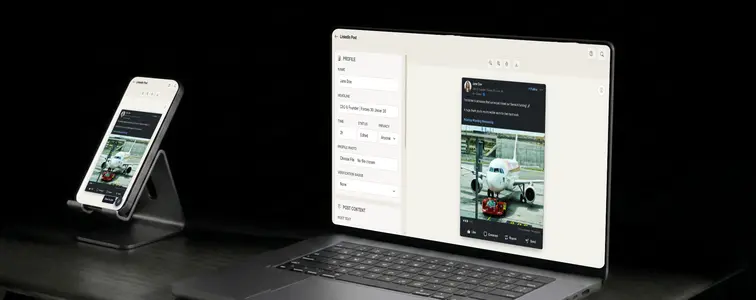
LinkedIn is the network where screenshots get repurposed the most. A compelling post from an industry figure shows up in newsletters, in B2B case studies, in sales enablement decks, in thought leadership examples. The reason is that a LinkedIn post is the one format that can actually influence a buying decision, so people build whole campaigns around showing what strong professional engagement looks like.
Which means a well-made mockup is worth having. The LinkedIn Post Mockup Generator in MockupTown renders a post exactly the way the real feed shows it, with the profile, the content, and the full set of engagement details that make a LinkedIn screenshot recognizable.
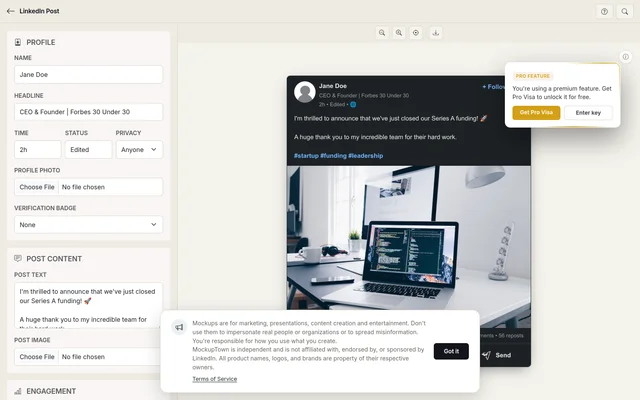 Profile and post fields on the left; the rendered LinkedIn post with reaction spread on the right.
The screenshot that can move a buying decision
A LinkedIn post mockup shows up in places where other social screenshots do not: investor decks, sales enablement materials, conference talks, internal strategy docs. The reason is simple. LinkedIn is the network where professional credibility matters, so a post with the right profile, headline, and reaction spread carries weight that a tweet or an Instagram post does not.
The headline carries as much weight as the name
On LinkedIn the headline is the second thing people read, and on a screenshot it is often the first. "CEO and founder" is fine; "Head of Growth at a SaaS company" or "Fractional CMO" tells the viewer who this person is and what role they play. The headline should always line up with the post's content, because a mismatch between a person's stated role and what they are posting about is an instant tell.
The post follows a rhythm that is distinctly LinkedIn
LinkedIn posts that do well share a shape: short paragraphs, a hook in the first line, a story or a lesson in the middle, and a few hashtags at the end. The generator handles multi-line text, so the mockup can keep that real format instead of a wall of text. Write like a professional who is also a human. The network rewards scannable posts and punishes walls of text, even in a mockup.
Reactions tell the story
This is where LinkedIn stands apart from the other networks. Besides likes, real posts show celebrates, insights, and a share count. A screenshot with only likes on a popular post looks incomplete, because the feed always shows the full spread. Keep the numbers proportionate: a post with thousands of likes and two comments is suspicious, while strong reactions with a matching number of comments and shares reads as genuinely popular.
Putting the post together
Set the name, headline, and profile photo, and add the verification badge only if the implied account would plausibly have one. Write the post in the short-paragraph style that works on the network, with a hook, a takeaway, and hashtags. Set the reaction spread across likes, celebrates, and insights, plus comments and shares. Pick the dark or light theme, preview, and export a high-resolution PNG. No uploads, no accounts, just the tool.
Where a LinkedIn mockup earns its place
- B2B marketing. Familiar imagery for professional services and SaaS products, showing the kind of reception a post about your offering might get.
- Presentations. Realistic LinkedIn screenshots give pitch decks and client reports a weight that bullet points cannot.
- Thought leadership. Demonstrate the content and engagement patterns a client should aim for before they start posting.
- Recruitment. Showcase company culture posts or employee advocacy examples in employer branding materials.
- Content planning. Preview how a post will look before publishing it, so the layout and tone are locked in ahead of time.
One note on honest use. Mockups are tools for demonstration: decks, examples, and creative work. Representing a mockup as a real post from a real person, especially one meant to influence a business decision, is deceptive and is not what the tool is for.
The post you need, built fast
A LinkedIn screenshot comes up more often than people expect, and when it does, you no longer have to crop a real one or build one from scratch in an editor.
Open the LinkedIn Post Mockup Generator, set a realistic profile, write the post in the short-paragraph style that works on the network, and set reactions that match the story. Export the theme your design needs and you are done.
Made with MockupTown, the free all-in-one mockup generator.
Frequently asked questions
Does LinkedIn Post Mockup Generator cost anything?
The core workflow costs nothing. Everything above is usable before an account could even enter the picture.
Are exports cleared for commercial work?
You own what you export, full stop. Pitch decks, storefront banners, sponsored posts: rights included.
Is signing up required?
There is nothing to register for. Registration was never built; the page runs on plain browser JavaScript.
Can I set multiple reaction types?
Yes. Set like, celebrate and insightful counts separately, along with comments and reposts, so the engagement matches the story.