
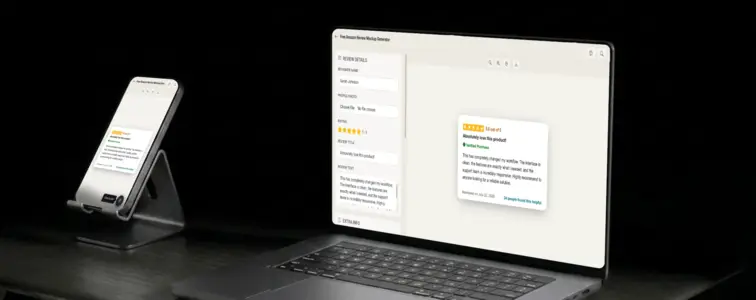
Amazon reviews are the trust signal for e-commerce. When someone is deciding whether to buy a product, they look at the star rating, the review count, and then they scroll through the reviews. The amber stars get them interested. The verified purchase badge tells them the reviewer actually bought the thing. The helpful count tells them other shoppers found the review useful. This is the conversion funnel for every product on Amazon, and the review card is where the purchase decision happens.
That is what makes an Amazon review mockup valuable. When you are building an e-commerce marketing page, a product pitch deck, or a case study about customer feedback, showing realistic Amazon reviews communicates that your product is trusted by real buyers. The problem is that building a convincing Amazon review card by hand is tedious, because the details are specific to Amazon's design system. The Amazon Review Mockup Generator in MockupTown renders the actual layout, so your mockup looks like it was pulled straight from Amazon.
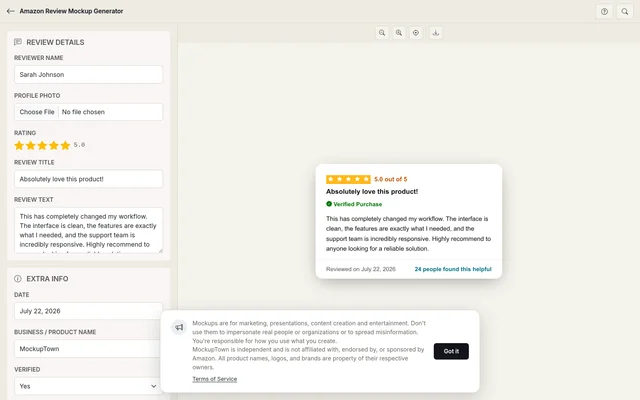 Amazon Review Mockup.
Why Amazon reviews carry unique weight
Amazon reviews are different from other review formats because they are tied to a specific product and a specific purchase. When someone reads an Amazon review, they are reading feedback from someone who actually bought and received the product. This creates a different kind of trust than a general business review, because the reviewer has skin in the game.
The design reflects this specificity. The Amazon review card is clean and focused, with the amber star bar that is instantly recognisable. The verified purchase badge is prominent, because it confirms that the reviewer actually bought the product. The helpful count adds another layer of community validation, because it shows that other shoppers found the review useful. Each element works together to create a visual language that says "this is a real product, reviewed by real buyers."
The anatomy of an Amazon review card
An Amazon review card has a specific structure that the generator reproduces accurately:
- The amber star bar at the top. Five amber stars, displayed as a filled bar. The amber colour is specific to Amazon and distinguishes it from Google's yellow or Yelp's red.
- The review title. Bold text below the stars. Amazon review titles are often short and specific, summarising the reviewer's opinion in a few words.
- The verified purchase badge. A blue checkmark that confirms the reviewer bought the product from Amazon. This is one of the most important design signals in e-commerce.
- The review body. The main text of the review. Amazon reviews tend to be detailed and specific, because the reviewer is talking about a physical product they received.
- The reviewer name and date. Amazon shows the reviewer's name (which may be a nickname) and the date of the review.
- The helpful count. How many people found the review useful. This reinforces community validation and helps other shoppers make decisions.
Verified purchase carries weight
The verified purchase badge is one of the most important elements in an Amazon review. It tells the reader that the reviewer actually bought the product from Amazon, rather than receiving it for free or leaving a random opinion. This adds a level of trust that other review formats do not always have.
The generator lets you toggle the verified badge on or off, so you can show reviews with or without the badge depending on the context. For marketing materials, the badge strengthens the impression. For educational content about review formats, showing both states demonstrates the difference.
Amazon's amber stars are iconic
Amazon's amber star bar is not just a colour choice. It is a brand identity. The amber colour appears in the star rating, the review count, and various UI elements throughout the platform. When you see that specific shade of amber in a review card, you immediately think of Amazon.
The generator uses the actual Amazon amber, so your mockup matches the real platform. This consistency is what separates a convincing mockup from one that looks assembled. The amber stars, the amber rating text, the amber bar that fills proportionally. Each element reinforces the brand identity.
The details that make it look like a real Amazon review
- Use the amber star rating. Amazon stars are amber, not yellow or red. The generator handles this automatically.
- Make the review detailed. Amazon reviews tend to be longer and more specific than other formats, because the reviewer is talking about a physical product. A two-sentence review reads as thin on Amazon.
- Add the verified badge when appropriate. The badge adds weight, but not every review has one. Use it when it makes sense.
- Set a helpful count. Amazon reviews show how many people found the review useful. This reinforces community validation.
- Format the date correctly. Amazon reviews show the date in a specific format. The generator handles this.
Where an Amazon review mockup earns its place
- E-commerce marketing pages. The most common use: showing what customers say about your product in the format people actually use to evaluate products. The Amazon format is the industry standard for e-commerce.
- Product pitch decks. Investor presentations use Amazon review mockups to demonstrate product quality and customer satisfaction. The format is instantly recognisable.
- Product documentation. Guides about product launches and customer feedback use Amazon review mockups as examples.
- Blog posts. Articles about e-commerce, product marketing, or review management benefit from realistic Amazon visuals.
- Educational content. Business courses that cover e-commerce and customer feedback use Amazon review mockups to teach platform-specific concepts.
A note on responsible use: is important: review mockups are for presenting your own work and demonstrating platform layouts. Using them to fabricate customer feedback for a real product crosses a line that is not worth crossing. Show what a review could look like - never pass off someone else's actual words.
Building an Amazon review card in two minutes
Open the Amazon Review Mockup Generator, enter the star rating, review title, and review text. Add a date, optional verified badge, and helpful count. Export as a high-resolution PNG. Everything runs locally in your browser.
The generator uses the actual Amazon review layout, with the amber star bar, the correct typography, and the faithful spacing. The result looks like a screenshot from a real Amazon product page, not a hand-built approximation.
When your project needs an Amazon review visual, you can build the exact card instead of describing one in text. Open the Amazon Review Mockup Generator, set the details, and export a mockup that looks like it belongs on the actual product page.
Made with MockupTown, the free all-in-one mockup generator.
Frequently asked questions
Does this connect to Amazon's API?
No. The mockup is built entirely from what you type into the editor. No data is pulled from Amazon, and no Amazon account is required.
Can I show the "Verified Purchase" badge?
Yes. The editor includes a toggle for the Verified Purchase badge, which displays in Amazon's standard blue checkmark format.
Can I specify a product variant?
Yes. Fields for product name, variant (color, size, model) and total rating count let you anchor the review to a specific product option.
What does the "Helpful" vote count look like?
The mockup displays the helpful count below the review text, matching Amazon's layout.